
Descriere
Most content protection plugins disable right click in the browser. Scrapers and AI crawlers don’t click or copy: they download the raw HTML, read the REST API and the feeds, or drive a (headless) browser. ScrapeLock works on the server, where automated copying actually happens, and leaves real visitors, customers and search engines alone.
- Runs on your own server. No account and no API key needed, and no visitor data sent anywhere by default. It downloads public IP lists; only if you turn on CDN blocking does it send the IPs it blocks to your own Cloudflare or Bunny account, with your API token (see External services).
- Starts in Monitor only. For its first 7 days a new install blocks nobody: requests that would be refused are logged as „Would block”, so you can see what it would do and adjust before it enforces. You can switch Monitor only on again at any time.
New in 3.8: see where bots attack, and close it with one click
- Attack report (Attacks tab). Where bots hit, also when nothing is refused: failed sign-ins and the usernames tried, how many try wp-admin and wp-login.php, XML-RPC calls, scanner and plugin probes, per day and hour, with country, „Block IP”, CSV, a dashboard widget and an optional weekly email.
- Vulnerable points. Lock XML-RPC, wp-admin, the sign-in page, readme.html, PHP in uploads and more with one click, with the risk explained; Apache rules written with a self-test and rollback, Nginx rules to copy.
- Sign-in protection. Failed logins limited per IP and per username (wp-login.php, every XML-RPC multicall call, application passwords), one error message, and an optional sign-in address of your own.
- Bunny CDN, deeper. Reads your pull zone’s logs to see attacks on cached pages, and locks wp-login.php, xmlrpc.php and .env/.git probes at Bunny. New in 3.9: every lock first shows what it would block and who hit it, and waits for your Confirm.
- Stealth (optional). BuiltWith and Wappalyzer get neutral addresses (/assets/…) instead of /wp-content/, another REST prefix and /sitemap.xml, without WordPress-only markup. Tested before it turns on.
What it stops, and what it cannot
Who
Result
How
AI training crawlers that say who they are (GPTBot, ClaudeBot, CCBot, Bytespider…)
Stopped
Bot list, 403
Fake Googlebot or Bingbot
Stopped
Official IP lists plus reverse and forward DNS
Fast scrapers from one IP (IPv6: one /64)
Stopped
Per-IP limits and temporary blocks
Scanners asking for .env, .git or backups
Stopped (optional)
Ban on the first probe
Site rippers (HTTrack, WebCopier, Offline Explorer…) and attacks in the User-Agent
Stopped
Built-in list, 403
Scrapers that read only the REST API, feeds or sitemaps
Slowed (optional)
Limit for IPs that never opened a page
Scrapers spread over many IPs
Slowed
Data center limit, CrowdSec blocklist, IP reputation, surge email, Emergency Mode
Headless browsers on home connections
Slowed
Human check, bot trap, limits
Copying by hand, screenshots, logged-in scraping
Cannot be stopped
Watermark, source link and TDM leave traces
Attackers who can run PHP on your server
Out of scope
No plugin can stop them
Whatever a visitor sees has already reached their device, so nothing stops a determined human. ScrapeLock closes the automated routes and leaves traces.
Who it is for
- Publishers, recipe, course and news sites: block AI training but stay in AI search, keep post text out of the REST API, GraphQL and full-text RSS, TDM opt-out.
- WooCommerce shops: limits for the product catalogue (Store API too), cart actions and coupon attempts, private feeds for price comparison sites and Google Merchant.
- Photographers: watermarks with the clean originals kept, hotlink rules for Nginx, Apache and Cloudflare.
- Directories and listing sites: page, search and „page not found” limits, a stricter limit for data centers.
- Agencies: presets, settings export and import, WP-CLI and Site Health.
Bots and crawlers
- Real search engines vs. fakes. Googlebot, Bingbot, Applebot and Yandex are verified against their official IP lists and with reverse + forward DNS. Real crawlers are never limited or blocked; fakes get a 403.
- AI training vs. AI search. Training crawlers (GPTBot, ClaudeBot, CCBot, Google-Extended, Bytespider and more) are blocked. AI search assistants (OAI-SearchBot, ChatGPT-User, PerplexityBot, Claude-SearchBot and more) can be allowed with one option and are verified with their official IP lists, so your site still appears in AI answers with a link.
- robots.txt gets the AI crawler lines, Content Signals and the Disallow line of an invisible bot trap that catches bots ignoring it. robots.txt, llms.txt and llms-full.txt are never blocked.
- Generic HTTP libraries (curl, python-requests and the like, used by apps and integrations) pass by default; a strict option blocks them too, and the Log has an „Always allow this User-Agent” button.
- Optional blocking of headless browsers and of scripts that copy a browser’s User-Agent but not its headers. A carefully disguised automated browser is not detected this way; the limits, the human check and the bot trap still apply to it.
- New in 3.5, optional (off by default): ban scanners on their first request for .env, .git, wp-config.php backups, database dumps and backup archives.
- 3.7: site rippers (HTTrack, WebCopier, Offline Explorer…) and attacks in the User-Agent are blocked; optional: SEO data crawlers (Ahrefs, Semrush, Majestic…) and requests that use the site’s IP instead of its name.
Limits and blocks
- Per-IP limits for pages, searches, REST / GraphQL, „page not found” (404) requests, sitemaps, visitors from data centers and, with WooCommerce, cart actions and coupon attempts (IPv6: per /64). Verified search engines and real shoppers are not affected.
- IPs that keep exceeding the limits are blocked for a while, optionally also at Cloudflare or Bunny CDN („Test connection” checks the token, the zone and the permissions).
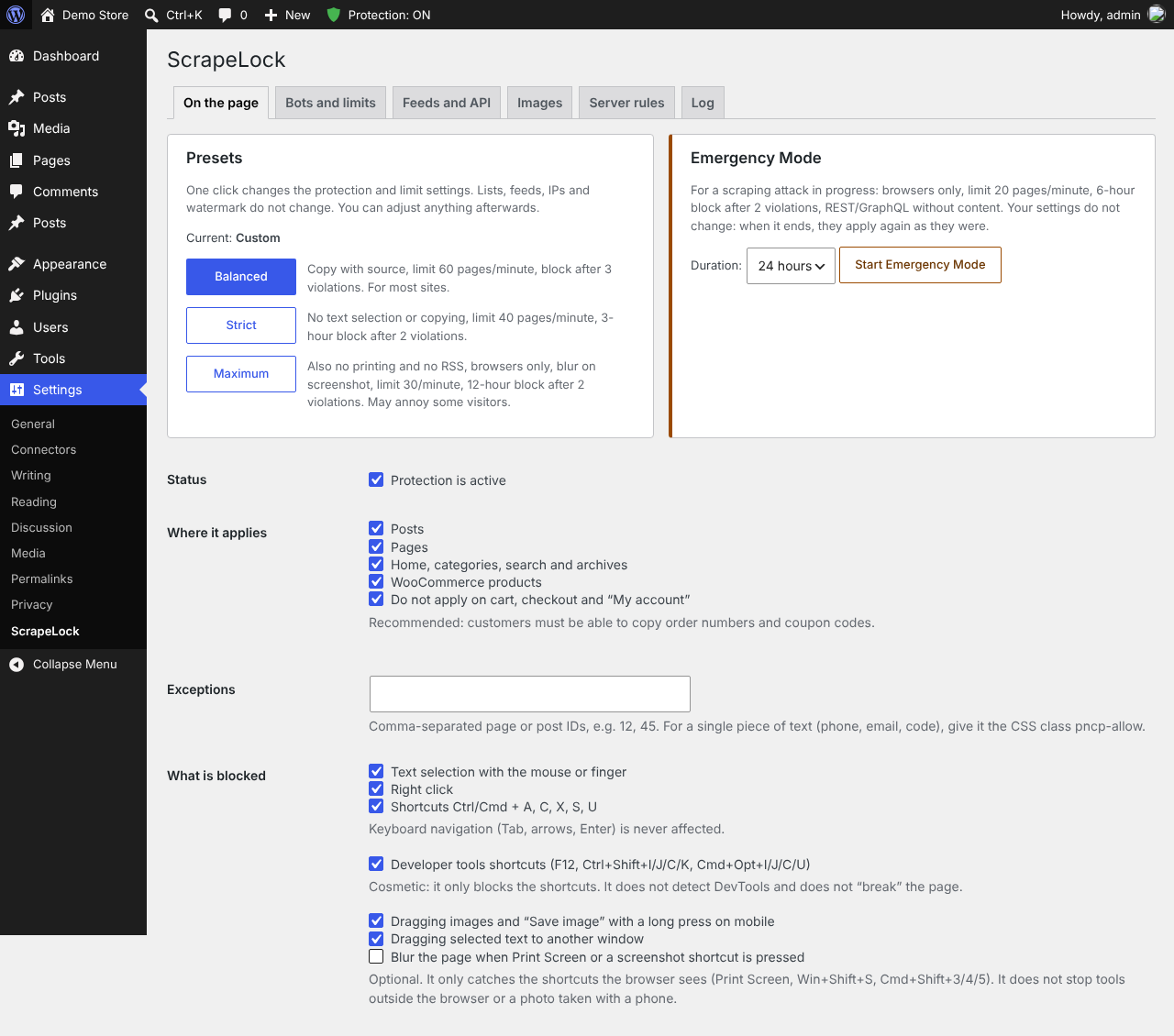
- Emergency Mode: stricter limits for 1 hour to 3 days, then your settings return on their own. When traffic suddenly jumps, ScrapeLock emails you a one-click button to start it.
- Optional human check without a captcha: visitors who have not scrolled, tapped or typed get a stricter page limit.
- 3.7, optional: IP reputation (good IPs are never blocked for a limit, bad ones stay slowed for days), a limit for IPs that read only the API, feeds or sitemaps, the CrowdSec community blocklist, and fail2ban. See the FAQ.
- Optional country rules, from Cloudflare’s or Bunny CDN’s country header or the free DB-IP Lite database.
- Optional pre-cache check (the bot list, the limits and the blocks also apply to pages served by WP Super Cache, W3 Total Cache, Cache Enabler, WP Rocket and the like) and early check (stops known bots and blocked IPs before the theme and the other plugins load).
- Always-blocked IPs / CIDR and referrers, usernames hidden from visitors, and trusted proxies (Cloudflare, Bunny CDN, your own), so the real IP cannot be spoofed.
Feeds, API and server rules
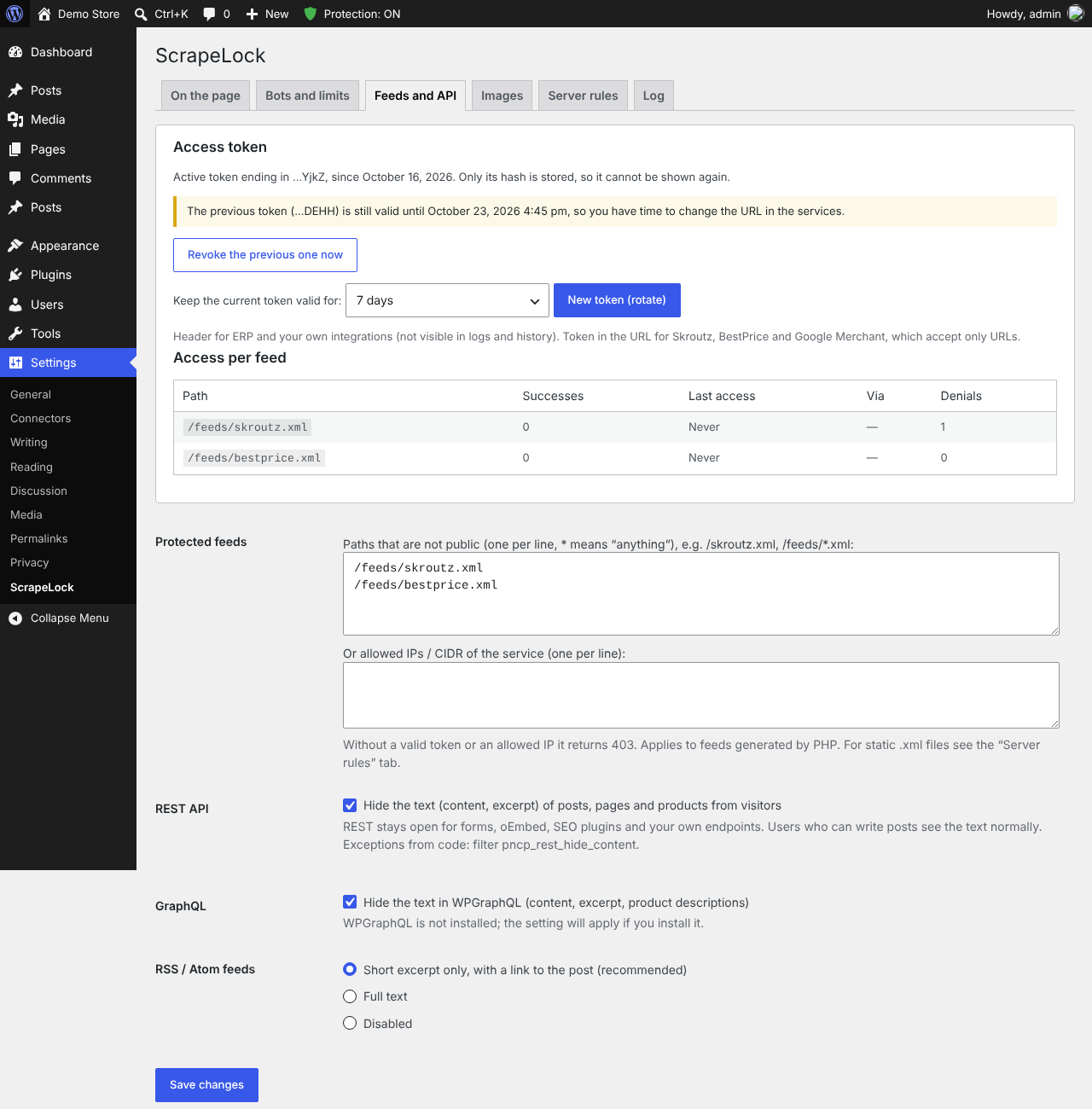
- Post, page and product text hidden from the REST API, WPGraphQL and full-text RSS for visitors: the routes scrapers use instead of the HTML.
- RSS with a short excerpt only, or disabled; with full text, an optional „The post … first appeared on …” line.
- Private XML feeds (Skroutz, BestPrice, Google Merchant, ERP) with a token in a header or the URL; only its hash is stored, it can be rotated with a grace period, and each feed has statistics.
- Optional: hide the REST API map and the versions of WordPress, PHP and the plugins, turn off XML-RPC pingbacks, list the REST routes open to anyone.
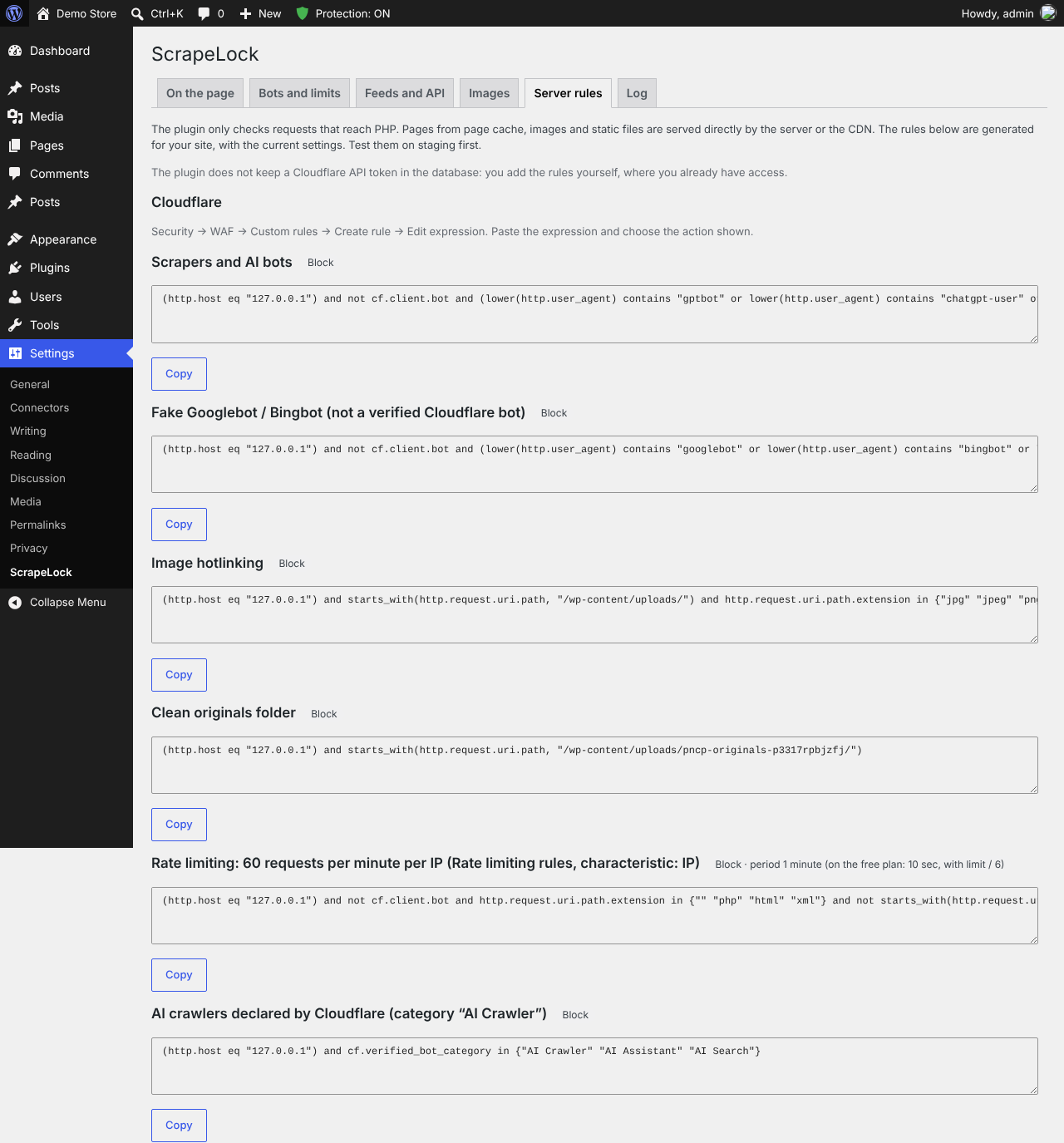
- Ready-made Nginx, Apache and Cloudflare rules for your own site, so cached pages and static files are protected too.
Check, test and tune
- Check a request (Log tab): pick GPTBot, a fake Googlebot, curl, a real browser or your own IP, User-Agent and address, and see whether ScrapeLock would allow, block or limit it, and why. Nothing is counted, logged or blocked; copy-ready curl lines test it for real.
- Staff are exempt while logged in (by default), so the admin bar reminds you: test in a private window.
- Site Health warns about settings that do not work as intended: robots.txt lines that crawlers do not get, private folders readable from the web, text still open through the REST API, feeds or WPGraphQL, another plugin doing the same job. These tests only fetch your own site.
- Settings that explain themselves: rejected lines are named, unsaved changes flagged, defaults labelled, options that may affect visitors or SEO tagged.
- Presets (Balanced, Strict, Maximum) with undo, settings export and import, and a block log with a 24-hour summary and automatic deletion.
- 3.7: visitors from AI assistants (ChatGPT, Perplexity, Claude, Gemini…) per assistant and page, counted on your server without personal data.
- Traffic (3.12): every request, from the Bunny CDN logs, your web server’s access log or WordPress itself: User-Agents by family, pages answering 404 or 5xx with the links that lead there, visitors, CSV and email alerts. Kept only in your database; off until you start it.
- WP-CLI:
wp scrapelock status,block,unblock,blocked,emergency,log,check --ip=<ip>(what ScrapeLock would answer, without side effects),settings,lockdown status,reputation,crowdsec,ai-referrals, in 3.8attacks,attack-report,login,harden,bunnyandstealth, in 3.12traffic, in 3.12.6rules,cdnandverify-file, in 3.12.7cache, in 3.12.8stealth checkandstealth debug, and in 3.12.9precheckandbreaker. - Abilities API (WordPress 6.9+) for administrators: read the summary, block or unblock an IP and start Emergency Mode from an AI agent or MCP client. None of them unlocks Lockdown.
On the page and images
- Block right click, copy, drag and common shortcuts, or allow copying with the source link appended. Text selection stays allowed by default, because blocking it also stops screen readers’ „read selection” and translation tools.
- Printing with the page link at the bottom, or no printing; optional page blur on screenshot shortcuts (for everyone, or only for visitors who are not signed in); no framing by other sites.
- AI opt-out declaration (TDM): header, meta,
/.well-known/tdmrep.json,noai. - Watermark in a corner, the centre or repeated diagonally, optionally on the full-size image too; otherwise visitors get the largest watermarked size, also in the WooCommerce zoom, lightbox and Store API. The clean original is kept, so the watermark can always be removed. Product images are not watermarked by default, because Google Merchant Center rejects them.
Members, courses and paid content (3.6)
- Who is reading, on every screenshot: a faint line over the page with the member’s user name and the time, so a screenshot, a screen recording or a photo of the screen shows whose account it came from. No web page can block screenshots; this makes them traceable.
- An invisible trace in the text: copied text carries the account and the day, hidden in invisible characters. Paste it under Log „Find whose copy this is”.
- Shared accounts: a page limit per account, and an email when one account is used from several addresses at once, optionally signing it out everywhere else.
- Fewer signs of WordPress for tools such as BuiltWith and for scanners.
Lockdown
- Freeze the site with a code from your authenticator app (Google Authenticator, Microsoft Authenticator, Authy and the like). While it is locked, nobody can change plugins, themes, WordPress core, users, roles or settings from wp-admin, the REST API or XML-RPC, not even an administrator or someone who stole a password.
- Administrators are frozen completely. Shop managers and other staff roles you do not tick keep their work (orders, products, coupons, posts, media), but not the rights that could take over the site. Visitors and customers browse, order, pay, register and comment as usual.
- Also enforced against code: a bug in another plugin cannot be used to activate plugins, change the site address or the admin email, add an administrator or unlock the lock. Code that can run its own PHP on your server can get around any plugin, ScrapeLock included. While the site is unlocked for a while, these rules are off for code too: unlock only for as long as you need.
- Sealed: the lock is signed with the keys in wp-config.php and kept outside the database (a guard file, a lock file, or a line in wp-config.php), so SQL injection in another plugin cannot unlock the site.
- Changes made straight in the database to the plugins, theme, site address, admin email, roles and ScrapeLock’s settings are put back; new administrators and changed staff passwords are refused at sign-in. See the FAQ for the full list.
- File integrity: every PHP, .htaccess and .user.ini file is fingerprinted and checked every hour while locked, and WordPress and the plugins from WordPress.org are compared with their official checksums. New or changed files are emailed to you and shown in Site Health; optional quarantine. When the site is locked again after an unlock, the files that changed while it was open are emailed to you too, before they become part of the new fingerprint.
- Unlock for 15 minutes to 2 hours for yourself only, or until you lock it again; every lock and unlock is logged and emailed. Ten one-time recovery codes for a lost phone. The QR code is drawn in your browser and the secret is stored encrypted, never sent anywhere.
External services
ScrapeLock downloads public lists of IP addresses, only for the features that use them. Each download is a plain GET request for a public file, made from your server by WordPress (User-Agent „ScrapeLock/version”). No data about your site, your content or your visitors is sent, and the request does not include your site address; as with any download, the provider sees your server’s IP address. The lists are stored in your database (or, for the country database, in uploads/scrapelock-geo) and checked on your server. They are data, not code or assets: no script, style, font or image is ever loaded from these addresses.
- Google crawler IP ranges, to tell real Googlebot from fakes. Downloaded once a day while protection is enabled, from https://developers.google.com/static/search/apis/ipranges/googlebot.json, https://developers.google.com/static/search/apis/ipranges/special-crawlers.json and https://developers.google.com/static/search/apis/ipranges/user-triggered-fetchers-google.json. Provided by Google LLC: Terms of service, Privacy policy.
- Bing crawler IP ranges, to tell real Bingbot from fakes. Downloaded once a day while protection is enabled, from https://www.bing.com/toolbox/bingbot.json. Provided by Microsoft Corporation: Terms of service, Privacy policy.
- Apple crawler IP ranges (3.10), to tell real Applebot from fakes without a DNS lookup. Downloaded once a day while protection is enabled, from https://search.developer.apple.com/applebot.json. Provided by Apple Inc.: Terms of use, Privacy policy.
- DuckDuckGo crawler IP …
Capturi ecran


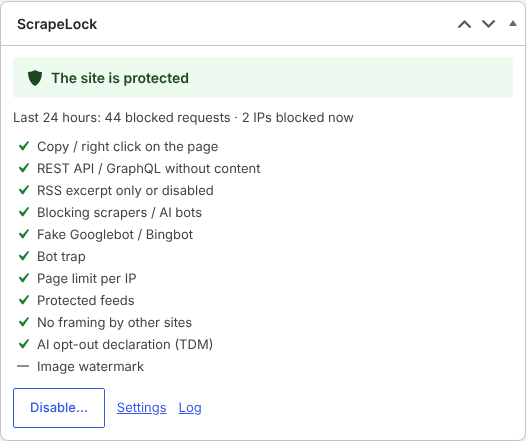
Instalare
- Upload the
scrapelockfolder to/wp-content/plugins/, or install the plugin from the Plugins screen. - Activate it. A new install runs in Monitor only for 7 days: watch the Log, then let it block.
- If your site is behind Cloudflare or another proxy, set „Real visitor IP” first (Bots and limits).
- Go to Settings ScrapeLock and choose a preset, or adjust each tab.
Upgrading from „Content Protect” (folder content-protect), the former name of this plugin: deactivate the old plugin, activate ScrapeLock. Your settings, tokens and log are kept. If you pasted the old Apache rules, replace the „# BEGIN Content Protect” block with the new „# BEGIN ScrapeLock” block.
Întrebări frecvente
-
My server’s CPU spikes, often at night. Can ScrapeLock help?
-
Often, yes: the cause is usually a crawler reading thousands of pages. Open the Log: the 24-hour summary shows the top IPs, User-Agents and reasons. The bot list, the per-IP limits and the data center limit handle most of it; during an attack, start Emergency Mode.
-
GPTBot or Bytespider is eating my bandwidth.
-
They are on the bot list, which is on by default, and are refused with a 403 (in Monitor only they are just logged). robots.txt also asks them to stay away. A 403 costs your server far less than a full page.
-
Bots fill carts or try coupon codes.
-
With WooCommerce, ScrapeLock limits cart actions and coupon attempts per IP and blocks IPs that keep going. It is not a fraud or card-testing tool: use your payment provider’s fraud protection for that.
-
Why don’t I see these bots in Google Analytics?
-
Most bots don’t run JavaScript, so analytics never counts them. ScrapeLock sees them on the server, and Monitor only logs them without blocking anyone.
-
Will it block real visitors, shoppers or forms?
-
Verified search engines are never limited or blocked, there is no captcha, and the first 7 days are Monitor only. If someone is blocked, the Log shows why: unblock the IP under „IPs blocked now”, add it to „Always allowed IPs”, or press „Always allow this User-Agent”.
-
Isn’t robots.txt enough?
-
No. robots.txt is a request that only polite bots follow. ScrapeLock writes those lines for you and also enforces them on the server, where impolite bots get a 403.
-
Can it stop screenshots or screen recording?
-
No, and no plugin can: the screenshot is taken by the phone’s or the computer’s own system, and a web page is not even told about it. (A black screen happens only with DRM-protected video, and even then a photo of the screen works.) What ScrapeLock does instead: „Show who is reading over protected pages” puts the member’s user name and the time on every screenshot, recording and photo, and „Hide an invisible trace of the account in the text” marks copied text. Both are on the „On the page” tab, under Members and readers.
-
Does blocking right click stop AI scrapers?
-
No. Scrapers download the page or read the REST API and the feeds; they never right-click. What stops them is the server side: the bot list, the limits and hiding your text from REST, GraphQL and RSS. Right-click blocking only slows down people copying by hand.
-
I can still right-click and copy. Is it working?
-
Probably: staff are exempt while logged in („Who is excluded”, On the page tab). Test in a private window: only there do you see the copy protection as visitors see it („Check a request” tests the server-side checks, not the browser scripts).
-
How do I test it?
-
„Check a request” (Log tab) shows what ScrapeLock would answer to GPTBot, a fake Googlebot, curl and more, without sending anything. Its „Check it yourself” lines test for real with curl from another computer. With WP-CLI:
wp scrapelock check --ip=<ip> --ua=<user-agent>. -
Can I use it with a security or firewall plugin?
-
Yes, they do different jobs. Avoid two rate limits on the same pages (keep one, or set the other’s limit higher), make both read the same real-IP header behind a CDN, and test in Monitor only first.
-
Will it block Google or Bing?
-
No. Verified search engines are never limited or blocked. Only fakes that pretend to be Googlebot or Bingbot are blocked.
-
Can I allow ChatGPT or Perplexity search but block training?
-
Yes. Turn on „Allow AI search engines and assistants” (Bots and limits). Training crawlers stay blocked. With „Verify AI search bots” on, only requests from the official addresses count as those bots; copies of the name get a 403. Turn the option off and ScrapeLock blocks them again from its own list, whether or not they are in your bot list.
-
Does ScrapeLock block WP Rocket’s or Jetpack’s own services?
-
No, while the plugin is active. WP Rocket’s service bot (WP-Rocket-SaaS, for Remove Unused CSS and critical CSS) and its cache preload (WP Rocket/Preload), and Jetpack’s servers and uptime monitor, are allowed like „Always allowed User-Agents” as long as that plugin is active. „Bots and limits” „Always allowed” lists them, with a button to stop allowing each one. The page limits, the bot trap and the attack checks still apply to them. Developers can add other plugins’ bots with the
pncp_plugin_botsfilter. -
Can I let one partner’s crawler in?
-
Yes. Add it to „Always allowed User-Agents”, pinned to its addresses so the name alone is not enough:
PartnerBot@203.0.113.0/24. The page limit still applies to it. -
Does it work with page cache?
-
ScrapeLock tells WP Rocket not to serve cached pages to the bots in its list. Other page cache plugins serve stored pages before WordPress loads: turn on the pre-cache check (Bots and limits) to apply the bot list, the page limits and the blocks to them too. Site Health tells you when a page cache answers first. A cache in the web server (Nginx FastCGI cache, LiteSpeed, Varnish) answers before PHP: there use the „Server rules” tab or blocking at the CDN.
-
Does ScrapeLock empty the Nginx fastcgi cache?
-
Yes, where it empties the page caches (settings saved, Stealth turned on or off), when it knows the cache folder: set
define( 'SCRAPELOCK_FASTCGI_CACHE_PATH', '/path/to/fastcgi/cache' );in wp-config.php, or Nginx Helper’sRT_WP_NGINX_HELPER_CACHE_PATH(or its „Delete local server cache files” method). On the server,wp scrapelock cache statusreads the Nginx configuration (nginx -T) to find the folder of the zone this site’s server block uses with fastcgi_cache, and prints the line to add:wp config set SCRAPELOCK_FASTCGI_CACHE_PATH '/path/to/fastcgi/cache' --type=constant --anchor="require_once ABSPATH . 'wp-settings.php';" --placement=before(the anchor is needed where wp-config.php lacks WP-CLI’s default anchor, the comment „That’s all, stop editing!”). It also says whether the constant is already defined and names that folder;wp scrapelock cache status --save-constantadds it for you after a trial on a copy of wp-config.php.wp scrapelock cache purge --all(andwp scrapelock cdn purge --all) empties it. Only cache files whose key names this site’s host are deleted, never files of other sites, links or folders outside it. -
What does the pre-cache check change on my server?
-
It adds two comment lines and one
includeline at the top ofwp-config.php, which loads the check from the plugin’s folder. Its data are plain files in a protected, randomly named folder inuploads/scrapelock/(in APCu or Redis when available, see below). It runs before the page cache, without a database, and stops blocked IPs, the bot list and visitors over the page limits. Search engines, forms, wp-admin and the REST API are left to the normal check; a login cookie, which it cannot verify, gets four times the page limit. Ifwp-config.phpis not writable, it shows the lines to add. Everything is removed when you turn it off or deactivate the plugin. Not on multisite. -
Where does the pre-cache check keep its counters and bans?
-
In APCu when PHP has it (shared by the PHP-FPM or Apache processes), otherwise in the Redis server of your persistent object cache, otherwise in files of its data folder. With APCu or Redis a visitor’s request reads and writes no file of the plugin: counters, bans, strikes, events and the configuration itself stay in memory, and a stalled disk does not stall the check. Redis is found automatically from the
WP_REDIS_*constants (Redis Object Cache) orWP_REDIS_CONFIGwhen the PHP Redis extension is installed and the object cache is Redis, and its connection (the password masked) is written into the check’s line inwp-config.php, because the check runs before the rest of that file. One server only (no Cluster or Sentinel); 50 ms to connect and to answer, otherwise the files are used for that request. Turn it off withdefine( 'SCRAPELOCK_PRECHECK_REDIS', false );or the filterpncp_precheck_redis(which also takes an array: host, port, path, db, user, password, prefix). APCu cannot be seen from WP-CLI: bans and settings changed there reach it through a signed request to the site, and every hour (WP-Cron) or from an admin page the bans are copied between memory and the files and the queued events go into the log.wp scrapelock precheckshows which store the check uses;wp scrapelock precheck syncandwp scrapelock precheck cleanupare there for a system cron job when WP-Cron is off. -
What is the early check?
-
An optional file,
wp-content/mu-plugins/scrapelock-early.php, that runs before the theme and the other plugins and stops blocked IPs and referrers, temporarily blocked IPs and the bot list with less server load. Search engines, logged-in users, forms and private feeds are left to the normal check. It is removed when you turn it off, deactivate or delete the plugin. -
My site is behind Cloudflare. What should I set?
-
Set „Real visitor IP” to CF-Connecting-IP and keep „Trust Cloudflare addresses” on. When every visitor arrives from a Cloudflare address, ScrapeLock offers a button that does this. With Nginx, also set
real_ip_header CF-Connecting-IP;andset_real_ip_fromfor the Cloudflare ranges, so the server rules see the real IP. -
My site is behind Bunny CDN. What should I set?
-
If your server already replaces the IP, keep „REMOTE_ADDR”. Otherwise set „Real visitor IP” to X-Real-IP and turn on „Trust Bunny CDN addresses”. When every visitor appears with a Bunny address, a button does this for you.
-
Can ScrapeLock block scrapers at Cloudflare or Bunny CDN?
-
Yes. In „Blocking at the CDN”, choose Cloudflare (an API token with only Zone Firewall Services Edit, for this zone) or Bunny CDN (your API key) and the zone ID; the token can go in
wp-config.php(SCRAPELOCK_EDGE_TOKEN) instead of the database. „Save and test the connection” only connects and tests. Once you turn on „Send temporary blocks to the CDN” (3.9; off on new sites, kept on for sites that already sent their blocks), every temporary block is also made at the CDN and removed when it ends. Your own rules are never changed; administrators’ recent IPs, search engines and the CDN’s addresses are never blocked there. Bunny CDN blocks single addresses only. Turning it off removes ScrapeLock’s blocks. -
Can someone go around my CDN?
-
If they find your server’s own address, yes. „Only through the CDN” (Real visitor IP) refuses every request without a secret header,
X-ScrapeLock-CDN, that your CDN adds (Bunny: Edge Rule; Cloudflare: Transform Rule). It can only be turned on from a request that has the secret. If the CDN stops sending it, adddefine( 'SCRAPELOCK_CDN_ONLY', false );to wp-config.php. -
Does ScrapeLock block the site’s own requests (Site Health, Vulnerable points, cron)?
-
No. WordPress signs every request to the site’s own address with an
X-ScrapeLock-Sigheader (an HMAC of the method, host and path, valid for 60 seconds and once), so it passes every check, also behind a CDN and in the pre-cache check. ScrapeLock also learns the address the server’s requests leave from and never blocks it, at the CDN either. If your server’s own requests leave from an address ScrapeLock cannot learn (a NAT gateway, an outbound proxy, another server of a cluster), list it in wp-config.php:define( 'SCRAPELOCK_SERVER_IPS', '203.0.113.50, 2001:db8::/64' );(addresses or ranges, separated by commas). List only your own servers, never a proxy or load balancer in front of the site: every visitor comes through it. -
Vulnerable points says „Checked at the server: … refused by …”. What does it mean?
-
The site asked for its own home page through its public address, and something on the way refused it. ScrapeLock then asked your server directly, so the result is still real, and the note names who refused. What to check:
- Bunny CDN edge: „Forward Host Header” is not needed any more (3.12.2). In the pull zone, check Bunny Shield or the WAF, bot protection, blocked IPs and countries, and Edge Rules that block: one of them refuses your server’s own address. ScrapeLock removes its own CDN blocks of that address at once.
- Cloudflare: Security Events for your server’s address, then allow it.
- Wordfence: Firewall Blocking and Live Traffic; add your server’s address to its allowlisted IPs.
- Another plugin or the web server: its deny rules or firewall.
- ScrapeLock: the note names the check that refused it.
To see both sides of the request, use „Run a real self-check now” in Log Check a request (or the preset „The site itself (loopback)”, which shows each layer without sending anything), the Site Health test „ScrapeLock self-request test”, or
wp scrapelock selfcheck --log. -
What does „Ban scanners on their first probe” do?
-
Off by default. When an IP asks for a file only attack scanners look for (.env, .git, wp-config.php backups, database dumps and backup archives at the top of the site) and the file does not exist, it is refused and blocked for 10 minutes (or your block time, if shorter; nothing is blocked when „Block after this many violations” is 0); a second probe within 24 hours gets the full block. Staff, verified search engines and the always-allowed IPs and User-Agents are never banned. On Nginx, add the updated server rules. With the rules, .env, .git, wp-config.php copies and SSH keys are never served even if they exist; a real database dump or archive of the same name is still served.
-
Does the human check show a captcha?
-
No. A small script waits for the first scroll, tap, key or mouse movement, solves a light challenge in the background and gets a cookie. Visitors without it are not blocked: they get a stricter page limit (20 per minute by default). Plain scripts never get the cookie.
-
Can blocked bots still read robots.txt and llms.txt?
-
Yes. robots.txt, llms.txt and llms-full.txt are never blocked, so every bot can read the rules it is asked to follow. If a robots.txt file in your site’s root replaces the one WordPress makes, Site Health shows the lines to add to it.
-
Which visitors from AI assistants are counted?
-
A page view by a visitor (not your staff) whose referrer is ChatGPT, Perplexity, Claude, Gemini, Copilot, DeepSeek, Grok, Le Chat, Meta AI, You.com, Phind or Kagi, or whose address carries their utm_source (ChatGPT adds utm_source=chatgpt.com). One count per day, assistant and page; no IP, User-Agent or cookie is stored. Pages served by a page cache without reaching WordPress are not counted. Filter
pncp_ai_referrersadds others. Turn it off under Log Log settings. -
How does the IP reputation work?
-
Off by default (Bots and limits Reputation). For each IP (IPv6: its /64) ScrapeLock keeps, for 7 days, when it last did something that tells about it: signed in (+80), passed the human check (+60), read pages (+10); the bot trap (−100), a scanner probe or an attack in the request (−80), a fake search engine (−70), a temporary block (−60), a bot-list refusal (−40), a limit exceeded (−20). Older events count about half. At 100 or more the IP is never blocked temporarily for exceeding a limit (it still gets „too many requests”); at −40 or less it gets the stricter page limit.
wp scrapelock reputation <ip>shows the score; unblocking an IP by hand forgets it. Filters:pncp_reputation_weights,pncp_reputation_good,pncp_reputation_bad. -
How do I connect CrowdSec?
-
On a VPS: install CrowdSec (it subscribes to the community blocklist on its own), run
cscli bouncers add scrapelock, and in Bots and limits CrowdSec blocklist choose „From my CrowdSec agent”, enter http://127.0.0.1:8080 and the key. Without your own agent (shared hosting), create a blocklist integration in the CrowdSec Console and enter its address with user:password as the key. „Stricter page limit” is the safer choice: addresses change hands. Private addresses, ranges wider than /16 (IPv6 /32), your server, CDN edges and official search engine addresses are never taken from a list.wp scrapelock crowdsec statusshows the state. -
How do I use fail2ban with ScrapeLock?
-
Turn on „Write each temporary block to the system log” (Bots and limits Temporary block), then copy the filter and the jail from the Server rules tab to /etc/fail2ban/filter.d/scrapelock.conf and /etc/fail2ban/jail.d/scrapelock.local, check logpath (/var/log/auth.log on Debian and Ubuntu, /var/log/secure on Red Hat) and run
fail2ban-client reload. The line looks likescrapelock[1234]: ban 203.0.113.5 for 60 minutes reason=rate_page site=example.com. Blocks made by the pre-cache check before WordPress loads are not written. -
Where do I see which points bots attack, and how do I close them?
-
Settings ScrapeLock Attacks. Choose 24 hours, 7, 30 or 90 days: you get the attacks per day and hour, the kinds of attack, the addresses attacked most, the wp-admin and sign-in attempts with the usernames tried, the IPs (with country and reputation) and what the Bunny CDN edge saw. Next to an address, „Lock this” closes that point (Vulnerable points); next to an IP, „Block 24 h” or „Always block”. Search engines, CDN addresses and your own address cannot be blocked there. „Download the report (CSV)” exports it, and „Weekly attack report by email” (Log tab) sends a summary every Monday.
wp scrapelock attacks --top=userslists the usernames tried. -
Can I see the access log, which User-Agents hit the site and which pages fail?
-
Settings ScrapeLock Traffic (off until you press „Start collecting”). It reads the Bunny CDN logs when their import is on (they include the pages served from the CDN cache), else the web server’s access log, else the pages WordPress serves itself. You get the requests over time, the User-Agents by family (browsers, verified and fake search engines, AI bots, scripts…), the pages that answer 404 or 5xx with the links that lead there (a link on your own site is marked as the one to fix), redirects, pages not served from the cache, the largest and slowest pages, the IPs and countries, and every single request with „Export CSV”. From a User-Agent you can block it or always allow it, after a confirmation that shows the exact line added. Everything stays in your database: each request is kept 3 days by default, the daily figures 90 days, and IPs can be stored masked (the last part removed: IPv4 /24, IPv6 /48). „Start collecting” asks how IPs are stored, with Masked chosen in advance; new installs store them masked by default. The suggested privacy policy text (Settings Privacy) describes Traffic, its retention and the IP setting.
-
What does the attack report record?
-
Failed sign-ins (with the username tried), visits to wp-login.php and /wp-admin/ that do not sign in, XML-RPC calls (each call of a system.multicall), ?author=N and the REST users list, scanner probes, „page not found” under /wp-content/plugins/ and /themes/, SQL/script/path patterns in the address (recorded only) and every request ScrapeLock refused. One row per hour, address and IP; a normal page view writes nothing. Exempt staff, verified search engines and the server itself are not recorded. Turn it off with „Record where bots and attackers hit the site” (Log settings). install.php and upgrade.php run without plugins, so they are recorded only with „Early check” on (and from the Bunny CDN logs); setup-config.php is seen only in the CDN or server logs. The „WordPress’s own files” point closes all three.
-
What does „Vulnerable points” lock, and can it break my site?
-
Each point lists what it protects, how many attacks reached it, and what may stop working (for example Jetpack and the mobile app use XML-RPC; „Allow Jetpack” keeps Jetpack working). Low-risk points can be locked together. Points that only the web server can enforce (WordPress’s own files, PHP in wp-includes or wp-content, directory listing) come with Apache and Nginx rules; on Apache ScrapeLock can write them into .htaccess, tests the site right after and puts the file back on its own if the site stops answering. Every point opens again with one click (or
wp scrapelock harden revert <id>). -
I moved the sign-in page and forgot the address
-
Add define( ‘SCRAPELOCK_LOGIN_SLUG_OFF’, true ); to wp-config.php: wp-login.php works again. Sign in, look up or change the address (Bots and limits Sign-in), then remove the line. „wp scrapelock login url” prints it too. In Monitor only both addresses work.
-
Can password guessing lock me out of my own account?
-
No. A username under attack is paused for a few minutes, but not for IPs it signed in from before, and its email gets a one-time link that lets you sign in at once. „Lost your password” always works. Too many wrong passwords from one IP block that IP for a while (30 minutes by default);
wp scrapelock login unlock <ip>lifts it. -
My site is behind Bunny CDN. What does ScrapeLock do with it?
-
Under Bots Blocking at the CDN, the Bunny card reads the pull zone’s logs (turn on logging at the pull zone; ScrapeLock has a button for it) and records attacks Bunny answered from its cache, which WordPress never saw. „Lock at Bunny” creates an Edge Rule in your own Bunny account that blocks an address (wp-login.php except your IPs, xmlrpc.php, .env/.git probes, readme.html…) before it reaches your server. Before every lock, ScrapeLock shows the addresses it cuts, the requests and IPs that hit them in the last 7 days and which of those IPs also used the site normally; nothing is sent before you click Confirm. wp-login.php is locked only when „Allowed IPs for the login page at Bunny” holds your current IP (an IPv6 /64 is fine). Bunny accepts at most 5 addresses or IPs in one condition, so a longer list is sent as several conditions of one rule, or as several rules „ScrapeLock: … (1/3)”; they are one lock in ScrapeLock (one Remove removes them all, and if one cannot be made, none is kept). „Allowed IPs for the login page at Bunny” holds at most 15 entries. ScrapeLock only changes rules it created (their description starts with „ScrapeLock:”); in Monitor only they are switched off. If a lock of wp-login.php keeps you out after your IP changed, remove the rule in the bunny.net dashboard or run wp scrapelock bunny unlock preset_login.
-
Can ScrapeLock hide that my site runs on WordPress?
-
Mostly. Turn on Stealth (Vulnerable points tab). Visitors then get neutral addresses for the theme, plugin, media and core files, served by rules that ScrapeLock writes into .htaccess on Apache or that you add to Nginx; the site tests them first and never turns them on if a file would not load. The REST API can get another prefix, the sitemap becomes /sitemap.xml, and readme.html and the like answer „page not found”. The footer comments of WP Rocket and Redis Object Cache and the file paths in script translations go too. Move the sign-in address too (Sign-in protection). What cannot be hidden: block and WooCommerce class names the styles depend on, cookies of signed-in users and shoppers, your hosting and DNS. WHOIS shows who registered the domain, not what the site is built with (use your registrar’s privacy option for that). If the site ever loses its styles after moving host, add define( ‘SCRAPELOCK_STEALTH_OFF’, true ); to wp-config.php.
-
Where do the Stealth rules go on Nginx and aaPanel, and how do I know they are current?
-
Inside the site’s server { }, at its top level and above the WordPress rewrite: panels such as aaPanel, BT Panel and CloudPanel put that rewrite at server level (if (!-e $request_filename) { rewrite … }), and it runs before any location. On aaPanel, save them as a file of their own in /www/server/panel/vhost/nginx/extension//, after scrapelock.conf (the files there are read in alphabetical order), e.g. z-scrapelock-stealth.conf: that folder is included at the top of the site’s server { }, before the rewrite include. Then nginx -t, reload, and „Test again” in Stealth. The rules carry a fingerprint: Server rules Stealth (and Site Health) says whether they are installed and up to date, out of date, or not found, asking the server directly first. After the folder of the addresses changes or a plugin or theme is added, ScrapeLock asks you to copy them again. With WP Rocket, Autoptimize, LiteSpeed Cache or W3 Total Cache, the inner wp-content / wp-includes of their minified and combined files get neutral codes too; the rules map them back by pattern, so files written after „Clear cache” keep working.
-
How do I check what visitors get with Stealth?
-
Run
wp scrapelock stealth check(orwp scrapelock stealth check <page of the site>, 3.12.8). It asks for the page as a visitor gets it, through the page cache and the CDN, and prints how many wp-content and wp-includes are left, WP Rocket’s minified addresses, the codes of the inner words, the cache headers and up to five addresses that still show a folder name. „words not used” means the server rules have words the pages are not rewritten with yet: runwp scrapelock stealth test(„Test again”). „rules” says whether the Stealth rules on the server are current, and „next” what to do: when they are out of date (as after an update that changes them), copy them again or runwp scrapelock rules install --stealth=<file>, thenwp scrapelock stealth test.wp scrapelock stealth statusshows the same, and whether the address map is in use or waiting for its rules. ScrapeLock now also tests a new address map by itself and uses it as soon as the server serves its rules. For a closer look add define( ‘SCRAPELOCK_STEALTH_DEBUG’, true ); to wp-config.php (or a number of hours, 1 to 72; the default is 24). Each page then writes one line per stage (Stealth’s buffer, the optimization plugin’s filter before and after) with counts only: no IP, User-Agent or query string, at most 256 KB, in uploads/scrapelock/ under a name that cannot be guessed. It stops by itself after those hours;wp scrapelock stealth debugprints the last lines and--cleardeletes the log. Remove the line when done. -
Can WP-CLI install the server rules for me (aaPanel)?
-
Yes (3.12.6).
wp scrapelock rules show --part=nginx-http(ornginx-server,stealth-nginx,stealth-apache,apache) prints a part exactly as the Server rules tab shows it.wp scrapelock rules statussays whether the installed rules are current, out of date or not found, how the server was asked and both fingerprints (--format=jsontoo).wp scrapelock rules installwrites only the files you name: each one first as<file>.new, shows the diff, keeps the old file as<file>.old, runsnginx -t, reloads, removes the.oldfiles and prints the status; when the test or the reload fails, every file is put back as it was.--dry-runonly shows the diff. On aaPanel, as root, with<site>the site’s folder name and<id>the name of part 1’s file:wp --allow-root --skip-themes scrapelock rules install --nginx-http=/www/server/panel/vhost/nginx/0.scrapelock-<id>.conf --nginx-server=/www/server/panel/vhost/nginx/extension/<site>/scrapelock.conf --stealth=/www/server/panel/vhost/nginx/extension/<site>/z-scrapelock-stealth.conf --dry-runThen the same without
--dry-run(add--yesto skip the question). Nginx files must end in .conf, Apache files be .htaccess (only ScrapeLock’s block is replaced) or end in .conf; a symlink is written through only into its own folder, and a leftover .old stops it. If nginx is not on the PATH, give--test-cmd="/www/server/nginx/sbin/nginx -t" --reload-cmd="/www/server/nginx/sbin/nginx -s reload": these two run through the shell exactly as typed. It never runs from a web request, and not while the site is locked.wp scrapelock cdn purge <address>…(or--all --yes) purges this site’s addresses at Bunny CDN and Cloudflare with the keys stored in ScrapeLock, which are never printed; addresses of other hosts are refused. It first empties the page caches of the active cache plugins (WP Rocket, LiteSpeed Cache, W3 Total Cache, WP Super Cache, WP Fastest Cache, Nginx Helper, Cache Enabler, SiteGround Optimizer;--no-plugin-cacheto skip), then the server’s fastcgi cache, then the CDN, so no cache stores an old page again. WP Rocket’s minified CSS / JS files stay unless you add--minify(with--all): use it after Stealth’s words or addresses change, since those files keep the addresses they were made with. -
A service asks me to put a file on my site to verify it. The bot list blocks it.
-
Use Server rules Verification files, or
wp scrapelock verify-file add /builtwith.txt --content=<the code>. The file (one name at the root, e.g. /builtwith.txt, /google.html, /BingSiteAuth.xml, or a name under /.well-known/; text only, at most 64 KB) is served by WordPress to every bot, also to one the bot list or "Block technology profilers" blocks, for 24 hours (1 to 168), then removed. It is purged at your CDN when added and when removed, and robots.txt lets the blocked bots read it. Server rules that block bots (Nginx part 1, Apache) let it through once you copy them again (orwp scrapelock rules install); their fingerprint does not change for it. „Also write it to the site’s root folder” is only needed when the server answers that address without WordPress; it never replaces a file that is there. An HTML or XML file with markup needs the unfiltered_html capability. -
Does a REST API list count more toward the REST limit?
-
Yes (3.5): an anonymous request for a long list from the REST API (posts, pages, products) counts 2 above 20 items per page, 3 above 50. Lists of up to 20 items and logged-in users count as before, and the WooCommerce cart and checkout are not counted. JSON 429 answers (REST API, GraphQL, cart) also carry
retry_after, the seconds of their …
Recenzii
Nu există nicio verificare pentru acest modul.
Contributori și dezvoltatori
„ScrapeLock – Content & AI Bot Protection” este un software open-source. La acest modul au contribuit următoarele persoane.
Contributori
Tradu „ScrapeLock – Content & AI Bot Protection” în limba ta.
Te interesează dezvoltarea?
Răsfoiește codul, vezi depozitarul SVN, sau abonează-te la jurnalul de dezvoltare prin RSS.
Istoric modificări
3.12.10
- Fix: when WP-CLI ran as root (
--allow-root) and a change turned on the pre-cache check or the early check, ScrapeLock rewrote wp-config.php (new file, then rename) as root:root with root’s mode; PHP-FPM could no longer read it („Failed opening required wp-config.php”) and the site went down. Every file ScrapeLock rewrites now keeps its owner, group and permissions (wp-config.php, the mu-plugin, .htaccess, the Seal and Lockdown files, the server rules), and a file or folder it creates as root (mu-plugins/scrapelock-early.php, uploads/scrapelock/*, logs, caches) is given to the owner of the WordPress folder (0644 files, 0755 folders). The pre-cache check’s cleanup, run as root, also hands back the data files 3.12.9 left to root. - WP-CLI: a warning when it runs as root, before every
wp scrapelockcommand andwp option update pncp_*/wp plugin deactivate scrapelock(not with –quiet or a machine-readable –format), naming the user to run it as (sudo -u <user> wp …). - A visitor’s request is unchanged: with APCu or Redis still no file access and no query of ScrapeLock.
3.12.9
- Fix: on a server whose disk stalls (iowait), requests waited in ScrapeLock’s own file and database work (the pre-cache check’s counter files, the cleanup of old minutes, the site-wide page count written with update_option) until PHP-FPM ran out of workers and the web server answered 504. With APCu or a Redis object cache, a visitor’s request now makes no file access and no database query of ScrapeLock at all: the pre-cache check keeps its counters, bans, strikes, probe memory, nonces, events and its configuration in APCu or Redis; in WordPress the log rows, new bans, attack records, Traffic rows, AI referrals and the automatic Emergency Mode wait in the object cache or APCu and a scheduled event writes them to the database once a minute, and ScrapeLock’s options and bans are read from there. Checked with strace on Nginx + PHP-FPM: 0 system calls on uploads/scrapelock and 0 queries of ScrapeLock per guest request. In a load test with the disk frozen for 20 seconds (30 requests a second, 20 PHP workers) no response took more than 1 second and none was a 504 (3.12.8: 69).
- Fix: without APCu or Redis, the pre-cache check never waits for a lock: counters are appended to their files, bans and strikes are replaced whole (written to a new file, then renamed), events are appended without a lock, and the old minutes are removed by the hourly event (without WP-Cron by one request a minute, at most 25 ms and never waiting).
- New: a circuit breaker. A counting or storage step of a visitor’s request that takes longer than 200 ms (the pre-cache check, the site-wide page count; DNS verification of crawlers: 1 second) is suspended for 10 minutes: requests pass without it, bans already in place still apply. Site Health shows what was suspended and why („ScrapeLock counting and storage speed”) and where the counters are kept („ScrapeLock counters”); the ScrapeLock page has „Resume counting now”. Filters
pncp_breaker_msandpncp_breaker_minutes. - New:
wp scrapelock precheck [status|sync|cleanup](which store the pre-cache check uses, asked of the web server’s PHP since WP-CLI cannot see its APCu; the copy of the bans between memory and the files; the hourly cleanup for a system cron job) andwp scrapelock breaker [status|reset]. - Change: where the object cache is Redis (Redis Object Cache’s
WP_REDIS_*constants orWP_REDIS_CONFIG) and PHP has the Redis extension, the pre-cache check’s line in wp-config.php now also carries the Redis connection (the password masked): the check runs before the rest of wp-config.php. ScrapeLock writes the new line itself after the update; turn Redis off for the check withdefine( 'SCRAPELOCK_PRECHECK_REDIS', false );. - Fix: with „Early check” on, APCu and no persistent object cache, the early check no longer reads four ScrapeLock options from the database in every request.
- Greek translation of the new texts.
3.12.8
- Fix: with Stealth on Nginx, the pages kept the inner wp-content of WP Rocket’s minified files (/assets//cache/min/1/wp-content/themes/…) when Stealth had been tested before 3.12.6 or before WP Rocket was active. The pages were rewritten with the words of the last „Test again”, while the rules shown and installed (and their „up to date” status) were made from the current map. ScrapeLock now tests a new map by itself and uses it as soon as the server serves its rules (the check address answers their fingerprint and the self-test passes), then empties the page caches. A new base folder still needs „Test again”.
- Fix: an address already made new by an earlier pass with fewer words gets the codes of the words it still carries, so every pass gives the same result.
- New:
wp scrapelock stealth check [<url>]: a page as a visitor gets it (through the caches), with the wp-content / wp-includes left, WP Rocket’s minified addresses, the codes found, the cache headers, whether the Stealth rules are current and what to do next.wp scrapelock stealth statusshows whether the address map is in use or waiting for its rules. - New: an opt-in Stealth debug log (
define( 'SCRAPELOCK_STEALTH_DEBUG', true );, or 1 to 72 hours): one line per stage of a page with counts only, no visitor data, at most 256 KB, ends by itself;wp scrapelock stealth debug [--clear]. - New:
wp scrapelock cdn purgefirst empties the page caches of the active cache plugins (WP Rocket, LiteSpeed Cache, W3 Total Cache, WP Super Cache, WP Fastest Cache, Nginx Helper, Cache Enabler, SiteGround Optimizer) and says which, then the fastcgi cache, then the CDN (--no-plugin-cacheto skip).--minify(with--all) also empties WP Rocket’s and Autoptimize’s minified CSS / JS. - New:
wp scrapelock cache statussays whether SCRAPELOCK_FASTCGI_CACHE_PATH is defined and prints the ready-made linewp config set SCRAPELOCK_FASTCGI_CACHE_PATH '<dir>' --type=constant --anchor="require_once ABSPATH . 'wp-settings.php';" --placement=before(WP-CLI’s default anchor is missing in some wp-config.php files);--save-constantadds it after a trial on a copy. - Fix: Stealth serves the sibling folders a stylesheet reaches with „../” (a child theme’s @import of its parent theme, a plugin’s url() into another plugin), unless the site has a real folder at the base address. These are new rules: copy the Stealth rules again.
- Fix: Stealth leaves links to uploads it does not serve (.zip, .docx, .csv…) at their real address (they answered 404), rewrites root-relative addresses after an escaped quote (url(„…”)), this site’s addresses URL-encoded in share links, and WooCommerce’s cart fragments (wc-ajax) for guests. A plugin or theme folder with a space or another character the rules cannot carry gets no address of its own (nginx -t failed, Apache answered 500 until the self-test).
- Fix: where ScrapeLock writes the Stealth rules into .htaccess, an update that changes the rules writes them again (they stayed „out of date”).
- Fix:
wp scrapelock cache purge <path>andcdn purge <path>with WordPress in a folder of the host use the home address (/about/ was purged at the root); verification files and /.well-known/ stay at the root. - Fix:
wp scrapelock rules installnever says „installed” without reloading the server (systemctl as the fallback, otherwise it stops and puts every file back), and keeps the owner and group of the file it replaces. The Stealth rules say in a comment why each word’s rule is there twice. - Fix: uninstall also removes the counts of the last fastcgi cache purge; the heading of
wp scrapelock selfcheck --logis translated. - Greek translation of the new texts.
3.12.7
- New: ScrapeLock also empties this site’s pages in the Nginx fastcgi cache wherever it empties the page caches (settings saved, Stealth turned on or off or its addresses changed, upgrades), when it knows the folder: the constant
SCRAPELOCK_FASTCGI_CACHE_PATHin wp-config.php, or Nginx Helper’s folder. Nginx Helper’s own purge does nothing when its method or folder is not the server’s. Only cache files whose key names this site’s host are deleted; links are never followed and system, home and WordPress folders are refused. - New:
wp scrapelock cache status | purge(finds the cache folder in the Nginx configuration with nginx -T or--nginx-conf, shows this site’s cached pages, purges all of them or some addresses,--dry-run, and prints the wp-config.php line to add).wp scrapelock cdn purge --allnow empties the server cache first, so the CDN does not fetch a stale page again (--no-server-cacheto skip it;--server-cachefor addresses). - Fix: with Stealth or „Hide that the site runs on WordPress”, WP Rocket’s footer comment („This website is like a Rocket … Performance optimized by WP Rocket”) and Redis Object Cache’s note are turned off (WP_ROCKET_WHITE_LABEL_FOOTPRINT and WP_REDIS_DISABLE_COMMENT, unless the site set them). Stealth also removes the footer comments of other performance and cache plugins that reach its buffer; conditional and other comments stay.
- Fix: with Stealth, the translations of scripts no longer carry file paths (wp-includes/js/dist/…, a plugin’s path) or the tool that made them; translations and text domain stay.
- Change: „What can never be hidden” (Stealth) names the comments a page-cache plugin adds when it stores the page (turn them off in that plugin).
- Greek translation of the new texts.
3.12.6
- New: Stealth with WP Rocket, Autoptimize, LiteSpeed Cache and W3 Total Cache: the inner wp-content / wp-includes of their minified and combined files (e.g. WP Rocket’s cache/min/1/wp-content/themes/…) get neutral codes too, also in their stored pages. The rules map them back by pattern, so files written after „Clear cache” keep working. Copy the Stealth rules again.
- New: the Stealth rules carry a fingerprint of their own. Server rules Stealth (and Site Health) say whether they are installed and up to date, out of date, from before 3.12.6, or not found, asking the server directly first; after a change of the folder of the addresses or a new plugin or theme folder, a notice asks to copy them again. The aaPanel place: a file of its own in extension// after scrapelock.conf, e.g. z-scrapelock-stealth.conf.
- New:
wp scrapelock rules show | status | install(install writes only the files named: .new, diff, .old, nginx -t, reload, everything put back on failure) andwp scrapelock cdn purge <address>… | --allwith the stored Bunny CDN and Cloudflare keys (never printed). - New: Verification files (Server rules, and
wp scrapelock verify-file): a file a service asks for to verify the site (/builtwith.txt, /google….html, /BingSiteAuth.xml, /.well-known/…), served to every bot for a few hours, purged at the CDN, allowed in robots.txt, then removed. - New: „Block technology profilers (BuiltWith, Wappalyzer, WhatCMS…)” on the Bots tab, off by default, with an updatable list (filter
pncp_tech_profiler_agents). „For my site” proposes it (not ticked) when such names are in the bot list, and removes those lines. - New: „For my site”: „Dismiss” per proposal (it comes back only when the setting or the proposal changes), „Show dismissed” with „Restore”, and „you chose this” next to a value you set against a proposal.
wp scrapelock wizard dismiss | restore <setting>. - Fix: the notice „The server rules are out of date (installed: not found, …)” right after saving the Bots tab although part 2 was installed. „Installed” is what the server last reported; „not found” only after a second check a few seconds later; when only part 1 or part 2 differs, the notice names it.
- Fix: a verification file refuses every PHP or ASP opening tag; deactivation removes the verification files; uninstall removes the new options and events.
- Change: the note under „Addresses that do not exist” (Log tab) is one line, the rest under „More”.
- Greek translation of the new texts.
3.12.5
- New: „Blur the page on screenshot shortcuts” (On the page) has „Applies to: Everyone / Only visitors who are not signed in”. Everyone is the default and what every existing site keeps. With the second choice signed-in members can take screenshots; staff in „Who is excluded” never get the blur, as before.
- New: the choice is made by the page itself, so it works with page caches (WP Rocket, Bunny CDN): ScrapeLock sets a small cookie,
pncp_si=1, in signed-in browsers (no personal data; the logged_in cookie’s paths, domain, Secure flag and expiry, SameSite=Lax, readable by the page) and removes it at sign-out. The page also reads WordPress’slogged-inbody class. Accounts signed in before the update get the cookie on their next page that is not served from a cache, or when they sign in again. Not set while the protection is off. The suggested privacy policy text names it. Someone who adds the cookie by hand only turns the blur off in their own browser: like the blur itself, it is a deterrent. - Greek translation of the new texts.
3.12.4
- Fix: on aaPanel (and BT Panel, CloudPanel) the Server rules tab read „Not installed” with part 2 of the Nginx rules in the site’s server { }: the panel’s WordPress rewrite is a server-level
if (!-e $request_filename) { rewrite ... /index.php last; }, which runs before Nginx chooses a location, so the check address went to WordPress (404). Part 2 now also answers its check address at server level, above every other line (not part of the fingerprint: installed rules stay current). Copy part 2 again. - Fix: the „installed / up to date” status asks the server itself first (the site’s host pinned to 127.0.0.1, the server address or
SCRAPELOCK_SERVER_IPS, signed), then the public address. Behind Bunny CDN without „Forward Host Header”, or with a cached 404, the CDN answered instead of the server. Without an answer at the check address theX-ScrapeLock-Rulesheader of the site’s own page counts, so the tab and the out-of-date notice agree; an http:// site address sent to https:// is followed. - New: when the rules are not seen, the tab, Site Health and
wp scrapelock status/selfchecksay in one line what answered and what to do: WordPress (part 2 not active, or behind a server-level rewrite), Nginx itself (another location took the address), only the CDN (Forward Host Header), the CDN’s cache (purge), something else. - New: the Apache card shows whether the Apache rules are installed (their header, the server asked first; the .htaccess is never read).
- Change: part 2 says where it goes („directly inside server { }, not inside a location { }”), and the aaPanel instructions name both places that work (Config below #SSL-END, or the extension folder included at the top), once only.
- Greek translation of the new texts.
3.12.3
- Fix: ScrapeLock’s own generated Nginx rules refused the site’s own checks with 403 (Vulnerable points „Check again”, Site Health, „Run a real self-check now”,
wp scrapelock selfcheck): they sent a Chrome User-Agent without Sec-Fetch-Mode and Sec-CH-UA over HTTPS, which the fake browser rule refuses before PHP can see the signature. Every self-check now sendsScrapeLock-Selftest/<version> (+<site address>), which is no browser’s, plus the signature; ScrapeLock’s PHP checks let it through by the signature, never by the name. - New: the generated Nginx and Apache rules never block the server itself: its own addresses (127.0.0.1, ::1, the server address, the outbound address learned from the site’s signed requests,
SCRAPELOCK_SERVER_IPS) are exempt from every block, the loopback and private ones only when no proxy passed the request on. Never a CDN edge, never an invalid entry. The Server rules tab lists them; behind a CDN,real_ip(Nginx) ormod_remoteip(Apache) makes the server’s own requests through the CDN keep its address. - New: the rules carry their fingerprint in the header
X-ScrapeLock-Rules, sent only to the site’s own signed requests. Every self-check compares it with the rules the current settings give; when they differ (also right after saving a setting that changes them), an admin notice on ScrapeLock’s pages and the dashboard and a Site Health result say „The server rules are out of date (installed: X, current: Y)”, with „See what changed” (a line diff). Sites that never installed the rules are not told anything. Nginx rules of before 3.12.3 are recognised by their check address. - New: when the web server refuses the site’s own request before WordPress, the self-check checks it against ScrapeLock’s own rules and says „Refused by ScrapeLock’s own server rule (fake browser)” (or the rule it was) and what to do, instead of „web server”.
- Change: with „Always allowed IPs” the page limit of the Nginx rules does not count the server either. A zone without them keeps its key, so Nginx reloads the new rules.
- Greek translation of the new texts.
3.12.2
- Fix: behind Bunny CDN without „Forward Host Header” (its default) the site’s own requests still got a 403 (Vulnerable points „Check again”, Site Health): the server gets the pull zone’s origin name as Host, and the signature was bound to it. The signature now names the site host it was made for and is verified for that host, whatever Host header arrives; a path with „//” and a HEAD passed on as GET match too. Signatures of 3.12.1 are still accepted.
- New: when something on the way refuses the site’s own request, the note says who: ScrapeLock (with the check), Bunny’s edge, Cloudflare, Wordfence, another plugin or the web server, and what to check there. ScrapeLock’s refusals carry the header
X-ScrapeLock: refused(the reason only for the site’s own request). - New: the request is then made once more straight to the server (the site’s own host and port pinned to 127.0.0.1, the server’s address or
SCRAPELOCK_SERVER_IPS, TLS checked as before). Vulnerable points give a real result marked „Checked at the server”, and for 6 hours the site’s other requests to itself (Site Health, WP cron) take that way, only once this WordPress itself answered there, until the public address answers again. - New: „Run a real self-check now” and the preset „The site itself (loopback)” in Log Check a request, the Site Health test „ScrapeLock self-request test” and
wp scrapelock selfcheck [--log]. The last 30 self-requests are noted without IP addresses, User-Agents, query strings or cookies. - Fix: a block of the server’s own address sent to the CDN earlier is removed at once.
- Fix: „=” entries (the whole User-Agent) in „Always allowed User-Agents” work in WordPress and in the pre-cache check; they matched nothing before.
- Fix: „Check a request” and
wp scrapelock checksay „Not counted” for a link preview of „Always allowed” on an image or file, instead of a counter. - Change: „For my site” shows each setting by its label, with its internal name in a „?” tooltip.
- Greek translation of the new texts.
3.12.1
- Fix: the site’s own requests (Vulnerable points „Check again”, Site Health, the Stealth test, cron) got a 403 behind Bunny CDN without the CDN secret. WordPress now signs each of them (
X-ScrapeLock-Sig, valid for 60 seconds and once) and a signed request passes every check, also the pre-cache check, whose line in wp-config.php is rewritten with the key on the next wp-admin page. - Fix: the address the server’s requests leave from is learned from the answers to the site’s own signed requests (kept 24 hours), never from a request of someone else.
SCRAPELOCK_SERVER_IPSin wp-config.php lists the server’s addresses when ScrapeLock cannot learn them. - Fix: the server’s own addresses are never sent to the CDN as temporary blocks, never counted from Bunny’s logs, let through by the wp-login.php lock at Bunny, and never recorded as attacks.
- Fix: FluentCommunity members’ portal reads count per account, at four times „REST API requests per minute”, and four of them as one page toward „Pages per minute per signed-in account”. Over it only that account gets a 429 (log reason „FluentCommunity REST reads per minute per member”, with the username); guests keep the per-IP limit, and no IP is banned for it.
- Fix: with „Allow AI search” off, the AI search bots are blocked from ScrapeLock’s built-in list, also when the 3.11 upgrade or „Remove from the list” took them out of the bot list. Nothing is written back into the list.
- Fix: „Check a request” checks images, video, fonts, CSS and JavaScript as „Media”, with the counter that decides („N of M this minute”), also in
wp scrapelock check. Every reason is shown by its label, never its internal key (Log tab, Check a request, WP-CLI). - Change: on new installs Traffic stores IP addresses masked; „Start collecting” asks how they are stored, with Masked chosen in advance, and says how long they are kept. Existing settings are kept. The suggested privacy policy text describes Traffic and the username kept with a per-account limit.
- New: „For my site” also proposes sensible values (ban scanners on their first probe, refuse requests by IP address, reputation, shorter temporary blocks, a page limit too low next to the human check, a REST limit too low for FluentCommunity or WooCommerce, a per-account limit for membership sites, OneSignal in „Always allowed”, and turning off options that only annoy visitors), each with its reason, all ticked.
- Greek translation of the new texts.
3.12.0
- New: Traffic tab (Records Traffic), off until „Start collecting”. Every request the site answers, from the Bunny CDN logs while their import is on (they include the pages served from the CDN cache), else the web server’s access log (Nginx or Apache „combined” format, rotated files included, with „Test this path”), else the pages WordPress serves itself. Only one source is counted at a time, so no request is counted twice.
- New: views for the requests over time, the User-Agents by family (browsers, verified and fake search engines, AI bots, SEO tools, link previews, scripts…), problem URLs (404 with the links that lead there, a link on your own site marked as the one to fix; 5xx, redirects, pages not served from the cache, the largest and slowest), visitors with their country and block status, and every single request with „Export CSV”. Every filter is in the address, so a view can be bookmarked.
- New: from a User-Agent, „Block this User-Agent” or „Always allow”, after a confirmation that shows the exact line added and warns for search engines and browsers; the settings are saved under „Earlier versions” first, with Undo. Your own browser is never blocked.
- New: email alerts about unusual traffic (server errors or pages not found far above the usual, a new heavy User-Agent, a source that stopped), at most one of each kind every 6 hours; a Traffic part in the weekly attack report and the dashboard widget, and a Site Health test while it collects.
- New:
wp scrapelock traffic(status, overview, top, problems, raw, export, purge, run, test-path). - Privacy: everything stays in the site’s database. Single requests are kept 3 days by default (1 to 14, at most one million), the daily figures 90 days (7 to 365). With „Masked” IPs the last part of every address is removed, also from the addresses stored before. Signed-in administrators, wp-admin, AJAX, cron and the site’s requests to itself are never recorded. On a network only a network administrator may set or test the access log.
- Performance: with a million requests stored every view answers in a few seconds (a covering index, status filters over long periods from the daily figures, one pass for a User-Agent, path or IP).
- Greek translation of the new texts.
3.11.0
- Fix: the site’s own requests through the CDN (Site Health, the Security headers check, cron, cache preloads) got „No browser headers” (403), because behind Bunny the server’s public address was not known. The server’s addresses (SERVER_ADDR, what the site’s names resolve to without CDN addresses, and addresses learned from the site’s own signed requests) pass every check, also the early and pre-cache checks and the Vulnerable points log. Never by User-Agent, and only with a visitor IP that can be trusted. The signature is never sent on when such a request is redirected to another host, and a newly learned address reaches the pre-cache check in the same request (Site Health no longer calls it „on but not running” until WP cron runs). Filter
pncp_server_ips. - Fix: the service bots of active plugins (WP-Rocket-SaaS) are also allowed in the pre-cache check, and the early check knows the bots that other plugins add with
pncp_plugin_bots. - Fix: GET and HEAD requests for /.well-known/ are never refused for an empty User-Agent, and GoogleAssociationService, Chrome’s Privacy Preserving Prefetch Proxy, Apple’s AuthenticationServices and OneSignal count as allowed there. Addresses on Google’s or Apple’s official lists are never refused by the empty User-Agent, „Browsers only” or headless checks. New installs also have these four in „Always allowed”. Filter
pncp_well_known_agents. - Fix: images, video, fonts, CSS and JavaScript no longer count as pages toward the page limits or automatic Emergency Mode. They have a counter of their own (10 times „Pages per minute”, never a violation), and link previews in „Always allowed” are not counted on them. Filter
pncp_static_extensions. - Fix: with „Allow AI search” on, its bots (OAI-SearchBot, ChatGPT-User, PerplexityBot…) are left out of the bot list everywhere it is used: WordPress, the early and pre-cache checks, the server rules and the Bunny log import. The Bots tab warns when the stored bot list still names them, with „Remove from the list”. Training crawlers stay blocked.
- Fix: „Ban scanners on their first probe” also bans on the first probe for files of other software: Spring Boot /actuator, Dockerfile and docker-compose, Railway, payment gateway and parameters files, credentials and secrets, .aws, .vscode/sftp.json, *.git/config, wp-conflg.php. Filter
pncp_probe_paths. - Fix: „Ban scanners on their first probe” also bans a scanner that a User-Agent check refuses first („Browsers only”, the headless check, an empty User-Agent, the bot list): python-requests and similar asking for /actuator/env or /.env got a 403 but were never banned. The same exemptions apply (staff, verified search engines, always-allowed IPs and User-Agents, real files, Private URLs, Monitor only, filter
pncp_probe_ban). In the early check, before WordPress knows whether the address is a page, only .env, .git, wp-config.php backups, dumps and backup archives. - Fix: status badges show „Set but not active” with the reason (the loader is not in wp-config.php, the CDN secret is missing, protection is off…) instead of „Off” for a setting that is on but not in effect: the status bar, Network and CDN, the dashboard widget, Site Health, Stealth and the weekly email.
- Fix: settings are named in words instead of raw keys (such as „block_ip_host: 1”) in the Emergency Mode line, the „Reset this tab” and import tables, and Site Health info. Filter
pncp_setting_labels. - New: FluentCommunity. While it is active, its portal (/hub/ or its own slug) counts as a content address in the Log, and the portal’s REST reads by signed-in members do not count toward „REST API requests per minute”. Every other check still applies to them. Filters
pncp_fluent_community_active,pncp_fluent_community_slug. - New: the Log names the bot list entry behind each „User-Agent in the bot list” block. A service blocked as a generic HTTP library gets „Allow this service”, which allows only its whole User-Agent.
- New: „For my site” on the first tab (and
wp scrapelock wizard). It finds the plugins, the CDN and the server in use, proposes settings for them with the reason for each, and gives advice that is not a setting. Changes that block more are not ticked. Nothing changes until „Apply selected”, and the settings before are saved under „Earlier versions” with an Undo. Not while the site is locked. - Change: the settings tabs are grouped (Content, Bots & limits, Security, Records). The Bots and limits tab is an accordion: only Bots, Limits and Failed sign-ins are open on a plain visit, and the network, CDN and IP list parts are under „Advanced”. Long lists (the bot list, the allow list and lists of 6 or more entries) show an entry count with Edit. Every field keeps its name and place in the form.
- Change: every setting has a one-line help text, and the longer explanation is under „More”. „May affect visitors/SEO” is a warning icon, and number fields show „Default: N”. Error and warning notices say in one sentence what to do. The EU directive citation of the TDM opt-out is under More.
- Change: new installs only: „Ban scanners on their first probe”, „Refuse requests that open the site by its IP address”, IP reputation on, and temporary blocks of 120 minutes. Existing sites keep their values. „Reset this tab” uses the new-install values, after its confirmation table.
- New: Greek translation of the whole plugin, shipped in languages/ (scrapelock-el.mo) and loaded on WordPress 6.2 and later; a language pack from translate.wordpress.org still comes first. Sentences that were split into pieces are now whole sentences for translators.
- Upgrade: with „Allow AI search” on, the AI search bots are removed once from the stored bot list, after a saved version under „Earlier versions”. Sites with the option off keep their list.
3.10.1
- New: Site Health „ScrapeLock site files” checks the files that phones, browsers and active plugins ask for at the root of the site. When a Site Icon is set and /apple-touch-icon.png answers „not found”, „Create it” writes a 180 × 180 PNG made from the Site Icon (and apple-touch-icon-precomposed.png). While OneSignal is active and /OneSignalSDKWorker.js answers „not found” (browsers that subscribed when the worker was at the root ask for it there), „Create it” writes OneSignal’s one-line worker. Without a Site Icon it links to where you choose one. Nothing is written without the click, a file of the site is never replaced, and Remove (or uninstall) deletes only files ScrapeLock wrote and nobody changed.
- New: Site Health „Wordfence and the visitor address”, while Wordfence …