

Descriere
Ruhler Community Resource Directory lets any nonprofit or community service organization – a food bank, a clothing closet, a legal-aid clinic, a tutoring program, a health clinic network – manage its physical locations and the services offered at each one, entirely from wp-admin, and publish an accessible public directory that visitors can search and filter.
Every core feature works on a plain WordPress installation. No API key, account, or paid service is required to publish a complete, useful directory.
Manage your locations in wp-admin
- A dedicated „Resource Locations” area in wp-admin, using WordPress’s own familiar publish/draft/trash workflow – no separate approval step, no new login for your staff to learn.
- A „Services Offered” taxonomy so you can organize and later filter locations by the services each one provides.
- Address and contact fields (street, city, state, postal code, phone, website).
- A weekly hours editor supporting hours-not-provided, closed, specific open/close times (including overnight hours that run past midnight), and open-24-hours – plus dated exceptions for a specific day (for example, a holiday closure) that override the regular weekly schedule.
- Map coordinates for a location are entered by hand, with clear checks for common mistakes: out-of-range values, decimal commas, degree-style entries, a latitude/longitude pair pasted into one field, and latitude and longitude entered in each other’s fields. Reversed values are explained with a one-click „Swap” action; nothing is ever swapped or rewritten automatically, and saved coordinates are never discarded because of an invalid edit.
- When the optional map is turned on, a map position preview in the location editor shows the marker. Click the map or drag the marker to propose a position; the coordinate fields update to match, and nothing is saved until you update the location. The coordinate fields remain a complete keyboard alternative.
- An optional „Find address on map” button, off by default, can look up the location’s address with OpenStreetMap Nominatim and list possible matches for you to choose from. See „Address finder privacy” below.
- A one-time, dismissible reminder on your Dashboard confirms your directory page is live and points you to „Add your first location.” It disappears permanently once you publish your first location, and never appears anywhere except the Dashboard and Plugins screens.
What visitors see
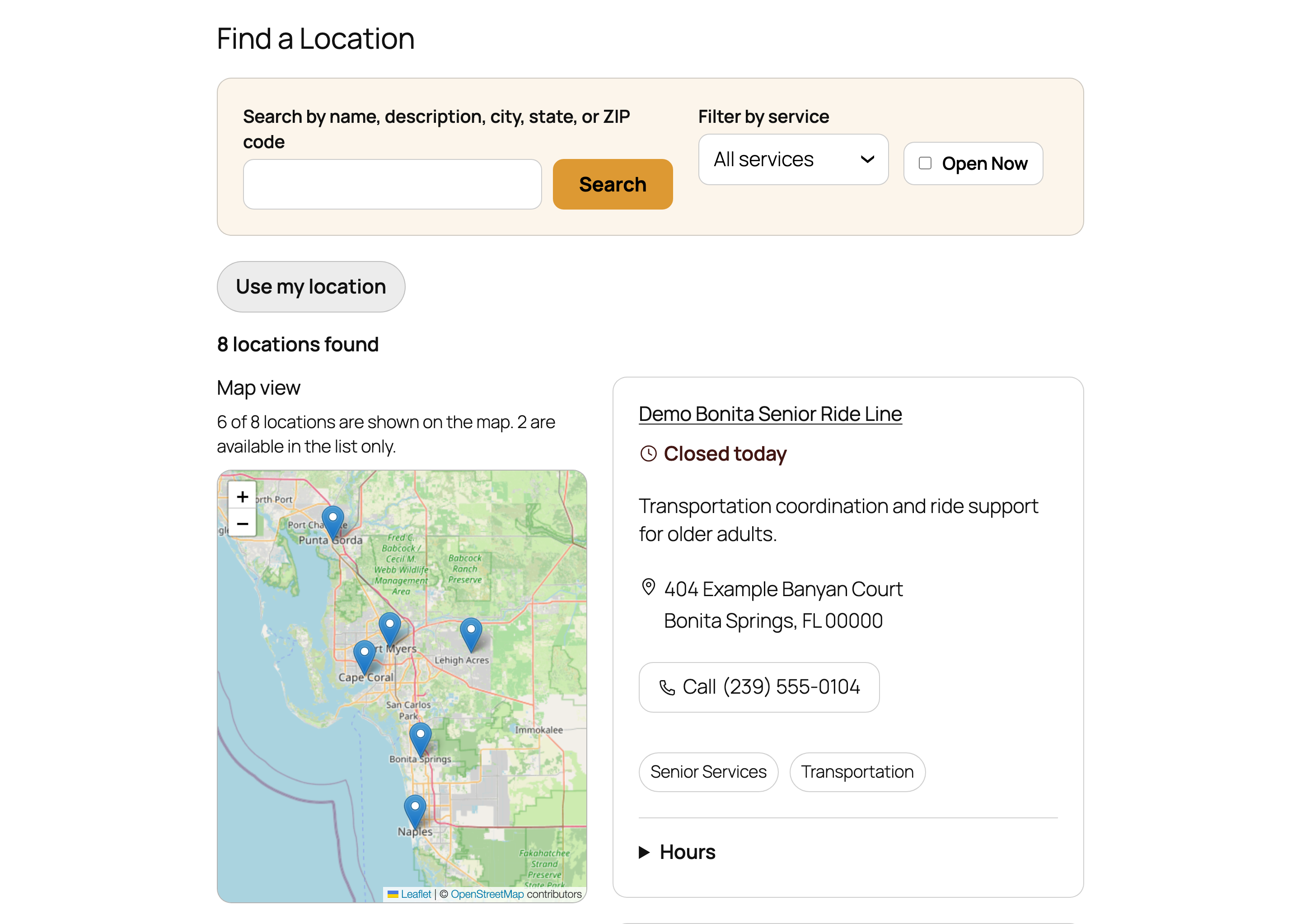
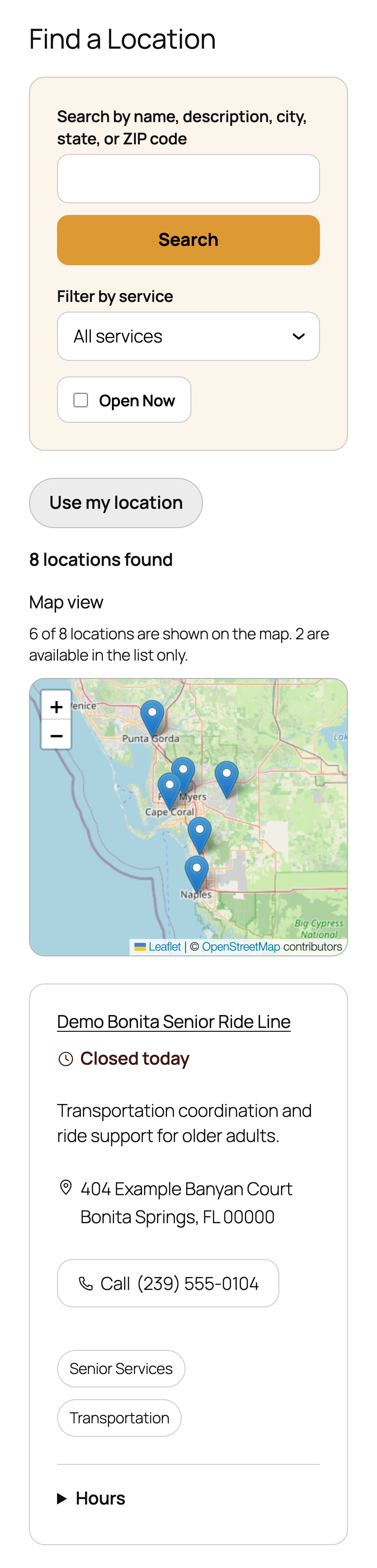
- A searchable, filterable public directory: search by name, description, city, state, or ZIP/postal code; filter by service; and an „Open Now” toggle – all without JavaScript. Every one of these is a real page reload with a real URL, so it works exactly the same with JavaScript on or off.
- Locations are always listed with the ones open right now first, then locations opening later today, then closed, then locations with no hours entered yet – so a visitor never has to hunt through closed locations to find one that’s actually open.
- Each location shows its current status in plain language – „Open now,” „Open until 5:00 pm,” „Opens at 9:00 am,” „Opens later today,” „Closed today,” „Open 24 hours,” or „Today’s hours unavailable” when hours simply haven’t been entered yet.
- An individual page for every location – name, status, description, services, address, phone, website, weekly hours, and any upcoming schedule exceptions – instead of the generic blog-post layout (author byline, post navigation, comments) WordPress would otherwise use. This replacement page works the same way on both classic and block themes, and your theme can override it (see the FAQ).
- „Near Me,” an optional, visitor-initiated distance sort. Nothing happens until a visitor clicks „Use my location” – no background or automatic location request is ever made. Near Me works whether or not the map is turned on.
- An optional map view, described fully in „Map privacy” below.
Customize the directory’s appearance
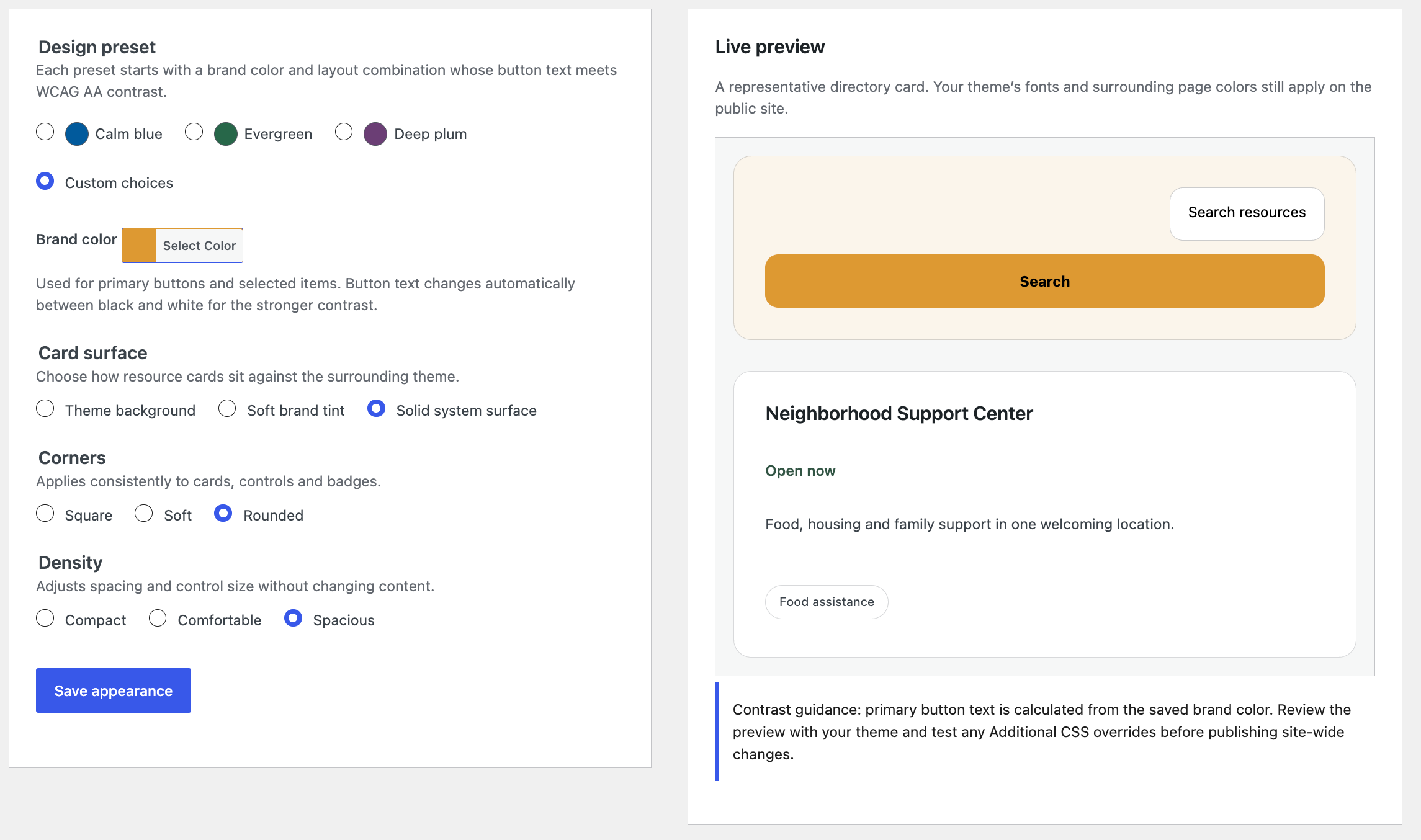
Administrators can open Resource Locations Appearance to customize the public directory without writing CSS:
- Accessible presets – start from Calm blue, Evergreen, or Deep plum, each chosen so its button text meets WCAG AA contrast for normal text.
- Custom brand color – or pick your own brand color with the standard WordPress color picker.
- Card surface – theme background, a soft brand tint, or a solid system surface.
- Corner style – square, soft, or rounded corners applied consistently to cards, controls, and badges.
- Spacing density – compact, comfortable, or spacious spacing and control size.
- Representative live preview – a sample directory card updates as you change each control, before anything is saved.
- Automatic high-contrast button text – the plugin calculates whether black or white text has the stronger contrast against your brand color and uses it for primary buttons.
- Restore defaults – one action removes the saved appearance option entirely and returns the directory to its unchanged theme-adaptive presentation.
With no saved customization, the plugin emits no appearance override CSS and keeps the theme-adaptive default styling. The Appearance screen makes no external requests and collects no tracking data. Appearance settings follow the plugin’s preserve-data uninstall policy.
The controls change the plugin’s existing scoped CSS custom properties; they do not create a separate theme layer. Saved overrides are attached after the plugin’s public stylesheet through WordPress’s normal enqueue API and only target .crd-locator-finder and .crd-locator-single. Theme styles and Additional CSS can still override those properties using normal cascade order or a more specific selector. If you add your own CSS, verify text/background and focus contrast after both sets of choices are applied.
Add it to a page
Two ways to publish the directory, and both support the same options:
- The
[crd_locator_finder]shortcode. - A „Resource Directory Finder” block in the block editor’s inserter, with the same settings available as a visual panel instead of shortcode attributes.
By default, either one shows every published location with no restrictions. Two optional settings let you scope a single instance of the directory:
- Limit to one service – shortcode:
[crd_locator_finder service="legal-aid"](using the service’s slug); block: the „Limit to one service” dropdown in the block’s settings panel. Once set, that instance only ever shows locations offering that service – visitors cannot switch it to another service or back to „All services,” and a search or „Open Now” filter a visitor applies still only searches within that one service. This is meant for a page dedicated to one kind of help (for example, a „Find Legal Aid” page), not a general-purpose filter a visitor can change. - Maximum locations to show – shortcode:
[crd_locator_finder count="5"]; block: the „Maximum locations to show” setting. Shows only the top N locations (by the same open-first ordering described above). Leave it at 0, or omit it, to show every matching location with no limit.
Both settings can be combined, and you can place as many separately-configured instances of the shortcode or block on your site as you like – each one works independently.
Map privacy
The map is a completely optional feature, off by default. Turning it on is a deliberate, informed choice:
- Map mode does nothing until an administrator visits the map settings screen, chooses a tile provider (the recommended OpenStreetMap default, which needs no API key, or the advanced custom XYZ raster tile option), and explicitly checks an acknowledgment box after reading the disclosure shown on that same screen. A custom tile URL must use HTTPS and include the
{z},{x}, and{y}placeholders. That acknowledgment is required again any time the provider, URL, or attribution text changes. - The map-drawing library (Leaflet, an open-source project) is bundled with this plugin. It is never loaded from an external CDN.
- The ready-made OpenStreetMap option requests tiles from OpenStreetMap’s tile service, subject to the OpenStreetMap tile usage policy and OpenStreetMap Foundation privacy policy. If you configure a custom provider, you are responsible for its permission, attribution, availability, privacy terms, and usage limits.
- Once enabled, a visitor’s own browser requests map tile images directly from whichever provider you chose. Tile requests necessarily reveal the approximate map area being viewed, and the provider also receives the ordinary information any web request carries (such as IP address and browser information), subject to that provider’s own policies. Resource names, descriptions, addresses, phone numbers, and every other database record from your directory are never included in a tile request.
- People editing a location can open the map position preview, which requests tiles from the same provider for their own browser – only after they select „Show map preview.”
- Near Me is entirely separate from the map and does not require it. A visitor’s location, when they choose to share it, is read directly from their browser and used only in that browser to sort the list by distance for that page view. This plugin does not store it, and does not send it anywhere – not to this plugin’s own site, and not to the map tile provider.
Address finder privacy
The address finder is a separate, optional feature, off by default and independent of the map. It uses an external service, OpenStreetMap Nominatim, operated by the OpenStreetMap Foundation.
- Nothing is sent until an administrator chooses Nominatim on the map settings screen and checks a separate acknowledgment, and then someone editing a location selects „Find this address.” There is no autocomplete, background lookup, bulk lookup, or lookup by site visitors.
- Each button press sends one request from your site’s server containing only that location’s street address, city, state or region, and postal code. Phone numbers, descriptions, services, contacts, and other site data are never sent.
- As the service’s usage policy requires, the request identifies this plugin and your site’s web address (in its User-Agent and Referer headers). The service also receives your server’s IP address and ordinary request information, subject to its own policies.
- Requests are limited to one per second for the whole site, and identical searches are answered from your site’s cache for up to seven days.
- Service availability and response quality are controlled by the OpenStreetMap Foundation and cannot be guaranteed by this plugin.
- Possible matches are listed for you to choose from; none is chosen automatically, and nothing is saved until you update the location.
- Results are © OpenStreetMap contributors, available under the Open Database License. See the Nominatim usage policy, the OpenStreetMap Foundation privacy policy, and OpenStreetMap copyright and licence.
- Developers can replace or remove the address service with the
crd_locator_geocoder_providersandcrd_locator_geocoder_active_providerfilters.
What this version does not include
- Automatic or bulk geocoding, and address verification. Coordinates are entered by hand, or – only when an administrator turns it on – looked up one location at a time with the optional address finder (see above).
- Importing locations from a spreadsheet or an external service’s API.
- Any integration with a third-party provider database.
- Built-in analytics or reporting.
- A ZIP-radius search backed by a postal-code distance dataset (search and Near Me both work today; a dedicated ZIP-radius dataset is not included).
- Any automatic, ongoing synchronization with an external data source.
None of the above requires an account, subscription, or API key to use this plugin’s current features – they are simply not part of this version.
Capturi ecran


Blocuri
Acest modul oferă 1 bloc.
- Resource Directory Finder Displays the searchable, filterable community resource directory – the same experience as the [crd_locator_finder] shortcode.
Instalare
- Upload the plugin files to
/wp-content/plugins/ruhler-community-resource-directory, or install it through the WordPress „Add New Plugin” screen directly. - Activate the plugin through the „Plugins” screen in WordPress. Activation only registers the location and service-taxonomy types this plugin needs – it never creates a page, never adds sample content, and never makes an outbound request.
- Go to „Resource Locations” in the wp-admin menu and add your first location: name, address, phone, website, weekly hours, and any services it offers. Publish it the same way you’d publish a WordPress post.
- Add the
[crd_locator_finder]shortcode, or the „Resource Directory Finder” block, to any page or post to display your public directory. - Optional: visit „Services Offered” to add more service categories, so visitors can filter by them.
- Optional: if you’d like a map alongside your list, go to the map settings screen, read the disclosure, choose a tile provider, and check the acknowledgment box. The same screen has the separate, optional address finder setting.
- Optional: administrators can open Resource Locations Appearance to configure the public directory. Choose a preset or adjust the controls, review the live preview, and select „Save appearance.”
That’s it – no API key, account, or additional setup is required for a working directory.
Întrebări frecvente
-
Does this plugin require an API key or external account?
-
No. Every feature described above works on a stock WordPress installation with no external account, API key, or paid service. The optional map and address finder use free public OpenStreetMap services only after an administrator turns them on.
-
What happens to my data if I deactivate or uninstall the plugin?
-
Deactivating never deletes any location, service, or setting data – your content is simply hidden until you reactivate. Uninstalling (removing the plugin from the Plugins screen) also preserves all of your location and service data; this version does not offer a way to make uninstall delete anything.
-
Can my theme control how an individual location page looks?
-
Yes. The plugin ships its own default page for each location so it never falls back to your theme’s generic blog-post layout. To override it:
- On a classic (PHP-template) theme, add
community-resource-directory/single-crd_locator_location.php(checked first) orsingle-crd_locator_location.php(checked second) to your active or child theme. - On a block theme, add a
templates/single-crd_locator_location.htmlfile to your active theme.
If your theme doesn’t provide either file, the plugin’s own built-in page is used.
- On a classic (PHP-template) theme, add
-
Do I have to turn on the map to use this plugin?
-
No. Search, service filtering, Open Now, the individual location pages, and Near Me all work fully with the map turned off, which is the default. See „Map privacy” above for exactly what turning it on does.
-
Can I limit the directory on one page to a single service?
-
Yes – see „Add it to a page” above for the shortcode attribute and the equivalent block setting. Once set, that instance is locked to the chosen service; visitors cannot change it.
-
Does this plugin work with the block editor and with classic (PHP-based) themes?
-
Yes to both. The shortcode and the „Resource Directory Finder” block work identically. Individual location pages have a dedicated override path for each kind of theme (see above), so your active theme’s own header, footer, and styling are always used.
-
How can I customize the directory’s colors and shape without editing plugin files?
-
Administrators can open Resource Locations Appearance. Choose one of the accessible presets as a starting point, or select „Custom choices” to set your own brand color, card surface, corner style, and spacing density. A representative live preview updates as you change each control, before you save.
You never pick button text colors by hand: the plugin calculates whether black or white text has the stronger contrast against your brand color and applies it automatically. Your theme’s fonts and surrounding page colors still apply, and theme styles or Additional CSS can still override the plugin’s design tokens (see below). Select „Restore defaults” at any time to delete the saved appearance option and return the directory to its unchanged theme-adaptive presentation; doing so removes all generated appearance CSS.
The Appearance controls make no external requests, load nothing from a third-party service, and involve no tracking.
For finer control, add scoped CSS through your theme’s Custom CSS/Additional CSS feature or a child-theme stylesheet. Override the plugin’s custom properties on its own public roots; for example:
.crd-locator-finder,
.crd-locator-single {
    --crd-primary-surface: #155e75;
    --crd-primary-text: #ffffff;
    --crd-selection-accent: #0e7490;
    --crd-border: #94a3b8;
    --crd-radius-md: 0.75rem;
}
Supported color properties are
--crd-text,--crd-text-muted,--crd-border,--crd-finder-surface,--crd-card-surface,--crd-surface-color,--crd-surface-muted,--crd-selection-accent,--crd-focus-ring,--crd-control-surface,--crd-control-text,--crd-primary-surface,--crd-primary-text,--crd-status-open,--crd-status-opens-later,--crd-status-closed, and--crd-status-unavailable.Supported geometry and focus properties are
--crd-radius-sm,--crd-radius-md,--crd-radius-pill,--crd-border-width,--crd-border-width-emphasis,--crd-focus-width,--crd-focus-offset, and--crd-control-min-size. Spacing and transition properties are--crd-space-1,--crd-space-2,--crd-space-3,--crd-space-4,--crd-space-5,--crd-space-6,--crd-space-8, and--crd-transition-fast. Saved appearance controls are printed afterpublic.csson the same WordPress style handle. Additional CSS normally loads later and can override them at equal specificity; a theme can also use a more specific plugin-root selector. Keep text/background and focus/background combinations contrast-accessible.
Recenzii
Nu există nicio verificare pentru acest modul.
Contributori și dezvoltatori
„Ruhler Community Resource Directory” este un software open-source. La acest modul au contribuit următoarele persoane.
Contributori
Tradu „Ruhler Community Resource Directory” în limba ta.
Te interesează dezvoltarea?
Răsfoiește codul, vezi depozitarul SVN, sau abonează-te la jurnalul de dezvoltare prin RSS.
Istoric modificări
0.3.4
- Fixed marker alignment so selected and unselected map markers stay anchored to their coordinates across zoom levels.
- Grouped the address, optional address finder, coordinates, validation, map preview, and marker-placement controls into one clear editor workflow before hours and schedule controls.
- Added coordinate-format and range guidance, reversed-coordinate detection with an explicit Swap action, and a map preview where administrators can click or drag the marker, restore the saved position, and review changes before updating.
- Added an optional, disabled-by-default OpenStreetMap Nominatim address lookup that runs only when an administrator selects the button, returns choices for review, and never saves a result automatically.
- Added progressive publishing-readiness feedback for unsaved relevant edits while keeping the saved server calculation authoritative.
- Clarified that OpenStreetMap is the recommended no-key map default and that a custom XYZ raster provider is an advanced option with provider responsibilities.
- Added locale-formatted Near Me mileage to every mapped result card while preserving strict distance order; list-only records do not show a distance, and Show all locations clears the mileage display.
0.3.3
- Added no-code Appearance Controls at Resource Locations Appearance for administrators, built with native, keyboard-operable WordPress settings controls.
- Added three accessible presets (Calm blue, Evergreen, Deep plum) plus custom brand color choices.
- Primary button text now automatically uses black or white, whichever has the stronger contrast against the chosen brand color.
- Added card surface, corner style, and spacing density controls.
- Added a representative live preview and a „Restore defaults” action that removes the saved appearance option and returns the unchanged theme-adaptive presentation.
- Documented the public design-token cascade: saved choices map to the existing plugin-scoped CSS custom properties, and theme styles or Additional CSS can still override them.
- Refined the service-filter dropdown indicator: it follows the control’s text color, no longer overlaps the selected service name, and falls back to the browser’s native indicator in Windows high-contrast (forced colors) mode.
- No telemetry, external requests, or required external service were added.
0.3.2
- Improved Near Me map framing around the visitor and the nearest three mapped locations, with list results synchronized to the visible map area while panning or zooming.
- Added a clearer „Show all locations” map reset.
- Clarified distance and mapped/list-only status wording.
0.3.1
- Refined the finder, result cards, filter and location controls, weekly hours, empty states, and responsive behavior across desktop, narrow layouts, and browser zoom.
- Improved keyboard focus visibility, high-contrast/forced-color behavior, readable reflow, and protection against clipped or overlapping contact content.
- Formalized plugin-scoped, theme-overridable design tokens for colors, surfaces, borders, radii, status indicators, spacing, and focus treatment.
- Added a delayed, permanently dismissible honest-review invitation shown only to administrators on plugin-owned screens after the directory has been in use for at least 14 days.
0.3.0
First public release. Earlier 0.1.0/0.2.0 version numbers were used only during internal development and were never published.
- Native wp-admin location management with WordPress’s own publish/draft/trash workflow.
- A „Services Offered” taxonomy for organizing and filtering locations.
- Address, contact, weekly-hours, and dated-schedule-exception fields, including overnight and 24-hour schedules.
- An availability-first directory order and plain-language „Open now / Open until / Opens at / Opens later today / Closed today / Open 24 hours” status.
- Accessible search, service filtering, and an Open Now toggle – all functional with JavaScript disabled.
- Visitor-initiated Near Me distance sorting, independent of map mode.
- An optional, consent-gated map with a configurable tile provider (a ready-made OpenStreetMap preset, or a self-hosted/other compatible server) and a bundled, locally-hosted map library.
- The
[crd_locator_finder]shortcode and a „Resource Directory Finder” block, both supporting an optional fixed-service scope and a maximum-results limit. - A dedicated, theme-overridable individual location page for both classic and block themes.
- A one-time, dismissible first-run reminder pointing to „Add your first location.”
- Safe activation and deactivation, and a preserve-your-data-by-default uninstall.