

Descriere
Sell your courses and memberships from any WordPress page, let members sign in with the account they already have, and lock pages, posts or single blocks to the course, group or product somebody bought. Every access rule is checked on your server, so protected content never reaches a browser that may not see it.
MemberArea Connector is the official plugin for MemberArea (memberarea.io), operated by Calendory Ltd. It links a WordPress site to your MemberArea, the platform where your memberships, courses and products live. Your WordPress site becomes the public face; the MemberArea stays the system of record for members, access and payments.
Sell from any page
- Checkout Button: a button that opens the MemberArea checkout for one of your products.
- Product: a product card with price and buy button.
- Cart: a shopping cart for several products at once.
- Course Catalogue: your published courses with covers, prices and buy links.
- Verified Badge: an embedded, verifiable badge for one of your courses.
Let members sign in
- Member Login: a sign-in button that becomes name, picture and a sign-out link once a member is signed in.
- Members sign in with their MemberArea account. They are sent to your MemberArea, approve the connection once, and come back signed in. Their password never reaches WordPress, and no WordPress user account is created for them.
Lock content to memberships
- Lock any page or post to signed-in members, to visitors who are not signed in, or to one of your courses, groups or products. Visitors without access see a short notice, are sent to sign in, or are redirected to a page you choose.
- Lock single blocks the same way, right in the editor: any block can be shown only to members, only to guests, or only to holders of a course, group or product.
- My Courses and Course Progress blocks show signed-in members their own courses and how far they are.
Built for real sites
- Works with page caches: pages stay cacheable for anonymous visitors, and personalised responses are marked not to be cached.
- Every block has a matching shortcode, from [memberarea_checkout] to [memberarea_course_catalogue], so the classic editor can place them too.
- Supports the WordPress privacy tools: a personal data exporter, a personal data eraser and suggested wording for your privacy policy page.
- Translated through translate.wordpress.org: German and German (Formal) are complete, and every string is open for translation into other languages.
Trying it out
The plugin is free. It needs a MemberArea on a paid plan: the API it runs on is part of Starter and every plan above it. A new MemberArea starts on a 14-day trial of Professional and asks for no credit card, so you can connect WordPress, place every block and lock a page before you pay anything. Sign up at https://app.memberarea.io/signup.
Step-by-step guides, from installing to locking a page, are in the Help Center: https://help.memberarea.io/categories/wordpress
External services
This plugin talks to one service: the MemberArea you enter on its settings page, for example yourname.memberarea.io. Nothing is sent anywhere until you save a domain there.
What your server sends:
- Calls to the MemberArea API to fetch products, prices, courses, groups and badges, to verify your API key, and, for signed-in members, to ask which content they may see. The API key is only ever sent from your server to your MemberArea. These requests carry your site address, so the MemberArea can tell connected sites apart.
- On pages that embed a MemberArea form, what a visitor types into it is sent to your MemberArea, where the submission is stored.
What a visitor’s browser loads:
- Pages carrying the product, cart, checkout or course catalogue blocks load a script from your MemberArea; badge pages load a badge script and an embedded badge page. On those pages the visitor’s IP address and browser details reach your MemberArea the same way they reach any embedded service, whether or not the visitor is signed in.
- Blocks that show pictures, that is the course catalogue, My Courses and the Member Login block, output image addresses exactly as the MemberArea returns them. Uploaded images are served from the MemberArea’s own image service; if you entered an image address hosted somewhere else, the visitor’s browser loads it from there.
- Opening the checkout shows a MemberArea checkout page in an overlay on your site. That page is served by the MemberArea and may load its own fonts, scripts and images from the addresses it uses.
What a visitor sends:
- Signing in sends the member to your MemberArea and back; while they are signed in, their membership identifier is used to check access, and their name and profile picture are fetched for the login block. Their email address is shared with WordPress only if you tick that option when connecting the site.
The MemberArea platform is operated by Calendory Ltd. Terms of service: https://memberarea.io/legal/terms-of-service. Privacy policy: https://memberarea.io/legal/privacy-policy. Imprint: https://memberarea.io/legal/imprint. The MemberArea you connect to belongs to whoever runs it, and may publish its own terms and privacy policy under /legal/terms and /legal/privacy on its domain.
Capturi ecran

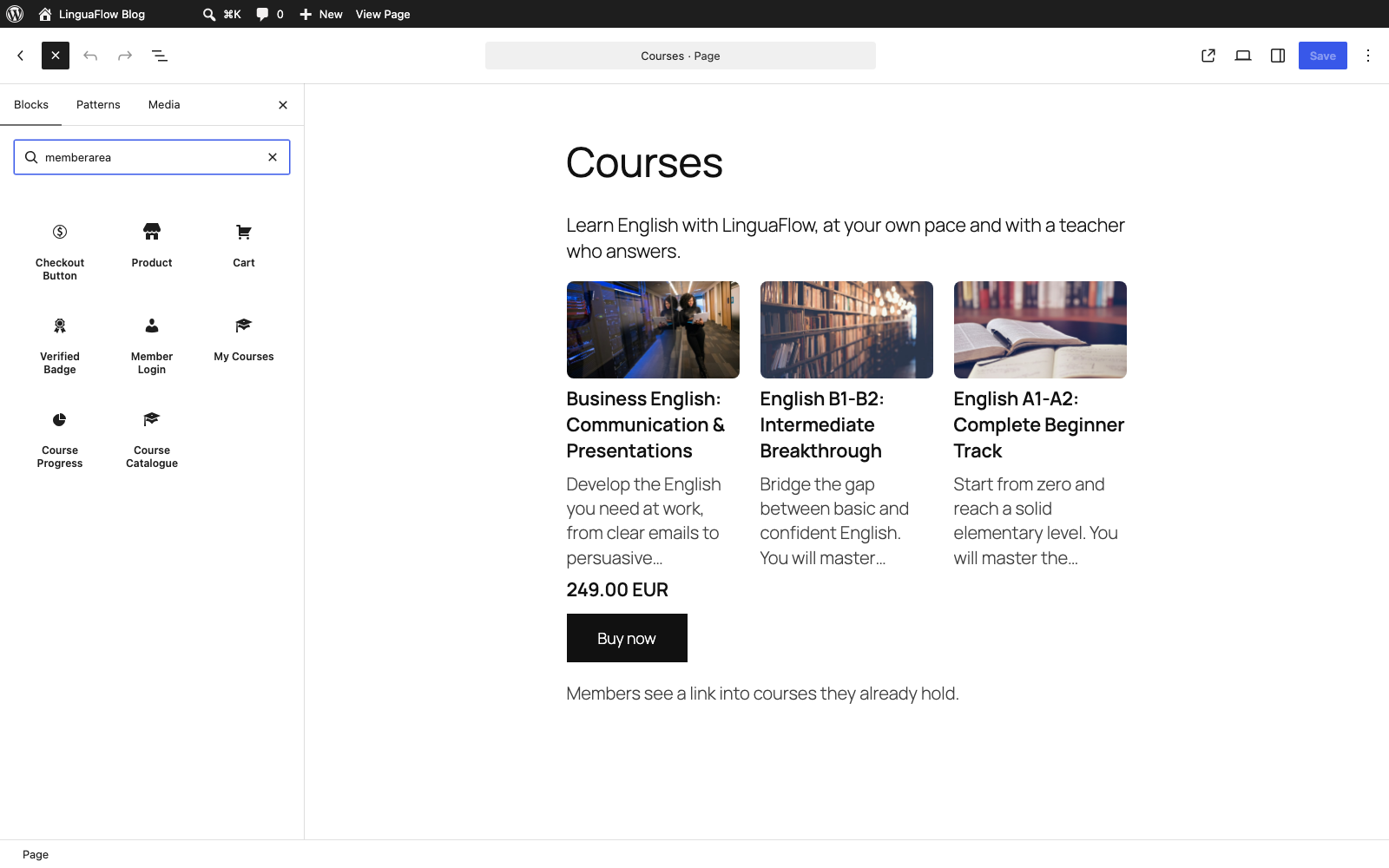


Blocuri
Acest modul oferă 9 blocuri.
- Cart A cart button with a dropdown that shows what visitors added and takes them to checkout.
- Course Progress Shows the signed-in member how far along they are, either in one course or across all of them.
- Product Shows one of your MemberArea products with an add to cart button, compact or with full details.
- Member Login Shows the signed-in member with name and picture, or a button to sign in with their MemberArea account.
- My Courses Shows the signed-in member the courses they hold, each linking straight into the MemberArea.
- Verified Badge Shows the verified badge of one of your courses, with participants and lesson count.
- Course Catalogue Shows the courses you sell, each with its price and a checkout button. Members see a link into courses they already hold.
- Checkout Button A button that opens the MemberArea checkout for one of your products.
- Form Embeds one of your MemberArea forms.
Instalare
- Install and activate the plugin through the Plugins screen in WordPress. If you do not have a MemberArea yet, start one at https://app.memberarea.io/signup; the 14-day trial includes the API access this plugin needs.
- In your MemberArea, go to Settings, then API, and create a key. Under WordPress, tick „View”; add „Manage” if members should be able to sign in on your site.
- In WordPress, go to Settings, then MemberArea. Enter your MemberArea domain and the key, and save.
- Use „Check connection” on the same screen. It tells you whether the key works and which business answered.
- For member sign-in, press „Set up member login” further down the same screen. This is a separate step: the API key alone does not enable it. Your site has to run on https and use any permalink structure other than „Plain”, and the plugin says so if it does not.
- Add your first block: the editor lists all of them under the MemberArea category.
The same steps with screenshots: https://help.memberarea.io/articles/connect-wordpress-to-your-memberarea
Întrebări frecvente
-
Do I need a MemberArea account?
-
Yes, on any paid plan: the plugin works through an API key, and the API is part of Starter and every plan above it. A new MemberArea starts on a 14-day trial of Professional and asks for no credit card, so you can build and test the whole setup first. The plugin is a connector: products, courses, members and payments all live in your MemberArea. The plugin itself is free.
-
Where is my API key stored?
-
On your WordPress server, in the options table. It is sent only from your server to your MemberArea and never reaches a visitor’s browser. The settings screen shows at most its last four characters.
-
Do my members get WordPress user accounts?
-
No. Members sign in against your MemberArea and get a session cookie on your site. No WordPress user is created, and your WordPress user list stays untouched.
-
Does it work with caching plugins?
-
Yes. For anonymous visitors, pages stay cacheable and carry a header telling shared caches to keep member and guest copies apart. As soon as a visitor is signed in, responses are marked not to be cached, including for the common cache plugins that honour DONOTCACHEPAGE.
-
Can I use it without the block editor?
-
Yes, for placing blocks: every block has a shortcode twin, namely [memberarea_checkout], [memberarea_product], [memberarea_cart], [memberarea_badge], [memberarea_login], [memberarea_my_courses], [memberarea_progress] and [memberarea_course_catalogue]. Locks are different: an existing lock keeps working whatever the editor, but setting one up needs the block editor, because the panel that holds it lives there.
-
Does it work on a multisite network?
-
Yes. Each site in the network connects to a MemberArea on its own, with its own key, and its stored data is removed site by site when the plugin is uninstalled. One caveat: uninstalling revokes the connection in the MemberArea only for the site it runs on. On the other sites, switch member login off before you uninstall.
-
What about the GDPR?
-
The plugin registers with the WordPress privacy tools: the personal data exporter lists everything the site holds about a signed-in member, the eraser removes it, and suggested wording for your privacy policy appears under Settings, then Privacy. What the site holds is deliberately small: a session, a name, a picture address and short-lived cached answers. If you connect without sharing email addresses, members cannot be looked up by email here, and the export screen says so.
-
What happens when I delete the plugin?
-
Uninstalling removes everything the plugin stored: settings, member sessions, cached answers and its connection. The connection is revoked in your MemberArea as well, as long as the API key is still valid and has the Manage permission for WordPress (on a network, see the multisite answer above). Two things remain by design. Access rules on pages are kept, so if you reinstall, protected pages come back protected instead of standing open. And shortcodes remain in your posts as plain bracket text, as with every WordPress plugin; remove them from the post content if you are leaving for good.
-
Where do I find help?
-
The Help Center has a WordPress section with step-by-step guides: https://help.memberarea.io/categories/wordpress. Questions about the plugin are welcome in the support forum here; anything about your own MemberArea, your members or your payments is answered at support@memberarea.io.
Recenzii
Nu există nicio verificare pentru acest modul.
Contributori și dezvoltatori
„MemberArea Connector” este un software open-source. La acest modul au contribuit următoarele persoane.
Contributori
„MemberArea Connector” a fost tradus în 2 locale. Mulțumim traducătorilor pentru contribuția lor.
Tradu „MemberArea Connector” în limba ta.
Te interesează dezvoltarea?
Răsfoiește codul, vezi depozitarul SVN, sau abonează-te la jurnalul de dezvoltare prin RSS.
Istoric modificări
0.1.3
- Fixed: a page lock now holds on pages built with page builders that filter the content late.
- Fixed: comments on a locked post are hidden and closed for visitors without access.
- Fixed: during a MemberArea outage, content for signed-in members closes after 15 minutes at the latest, so a member removed in the meantime cannot keep reading. Sign-in is now confirmed every 10 minutes.
- Fixed: locked content requested through the REST API in edit context goes only to users who may edit it.
- Fixed: after a site address change, setting up member login again revokes the old connection instead of leaving it behind.
- Fixed: after sign-in, members return to the page they started on, also on sites installed in a subfolder. A lock that sends visitors to the page they are already on no longer loops.
- Fixed: the Course Progress shortcode follows the course you pick, and the Checkout shortcode works inside a paragraph.
- Fixed: the Course Catalogue shows the course description, prices with the right decimals for each currency, and its checkout opens in the language of the site.
- New: the connection check warns when the API key belongs to a different business.
- New: the status line and the last error refresh as soon as you save a new key. The clock check is a warning now, not an error.
- Improved: error messages follow the language of the site, the cache button explains itself on sites with an object cache, and notices and check results are kept per user.
- Improved: widgets speak all nine MemberArea languages, and the plugin is prepared for Spanish, French, Hungarian, Italian, Dutch, Polish and Brazilian Portuguese on translate.wordpress.org.
0.1.2
- New: while nothing is connected, the settings screen shows the three setup steps instead of an empty form, with links to the matching guides.
- New: a dismissible notice after activation points to the settings screen.
- The plan the plugin needs is now named up front, together with the 14-day trial.
0.1.1
- Translations now come from translate.wordpress.org instead of being bundled.
0.1.0
- First release: nine blocks with shortcode twins, member sign-in against your MemberArea, page and block locks for courses, groups and products, privacy exporter and eraser.