Sari la conținut
WordPress.org

În Română

  • Teme
  • Module
  • Știri
  • Suport
  • Despre
  • Evenimente
  • Localizare
  • Dialog
  • Obține WordPress
Obține WordPress
WordPress.org

Plugin Directory

WP ShareX

  • Trimite un modul
  • Favoritele mele
  • Autentifică-te
  • Trimite un modul
  • Favoritele mele
  • Autentifică-te

Acest modul nu a fost testat cu ultimele 3 versiuni importante ale WordPress. S-ar putea să nu mai fie întreținut sau susținut și ar putea avea probleme de compatibilitate când este folosit cu versiuni recente ale WordPress.

WP ShareX

De joomdev
Descarcă
  • Detalii
  • Recenzii
  • Instalare
  • Dezvoltare
Suport

Descriere

WP ShareX is an advanced WordPress Social Share plugin enables you to add social share buttons on Posts and pages. You can assign buttons on Top of the Content, Bottom of the Content, Sidebar and on media.

Features of WP Social Share by JoomDev
1. 24 Social Network
2. You have the option to select either Icons or Icons with Text
3. 3 Button Shapes
4. 4 Button Animations
5. URL Shortening Option with Bitly and Goo.gl
6. Embed Twitter Handle and desired tags with Tweet
7. 4 Button display Location e.i. Top of the Content, Bottom of the content, Media, and Sidebar
8. Hide On Mobile Ability
9. Default Share Count Option. (You can play with your user’s mind)
10. Encourage your Audience to share your content with Share Incentive Feature

Capturi ecran
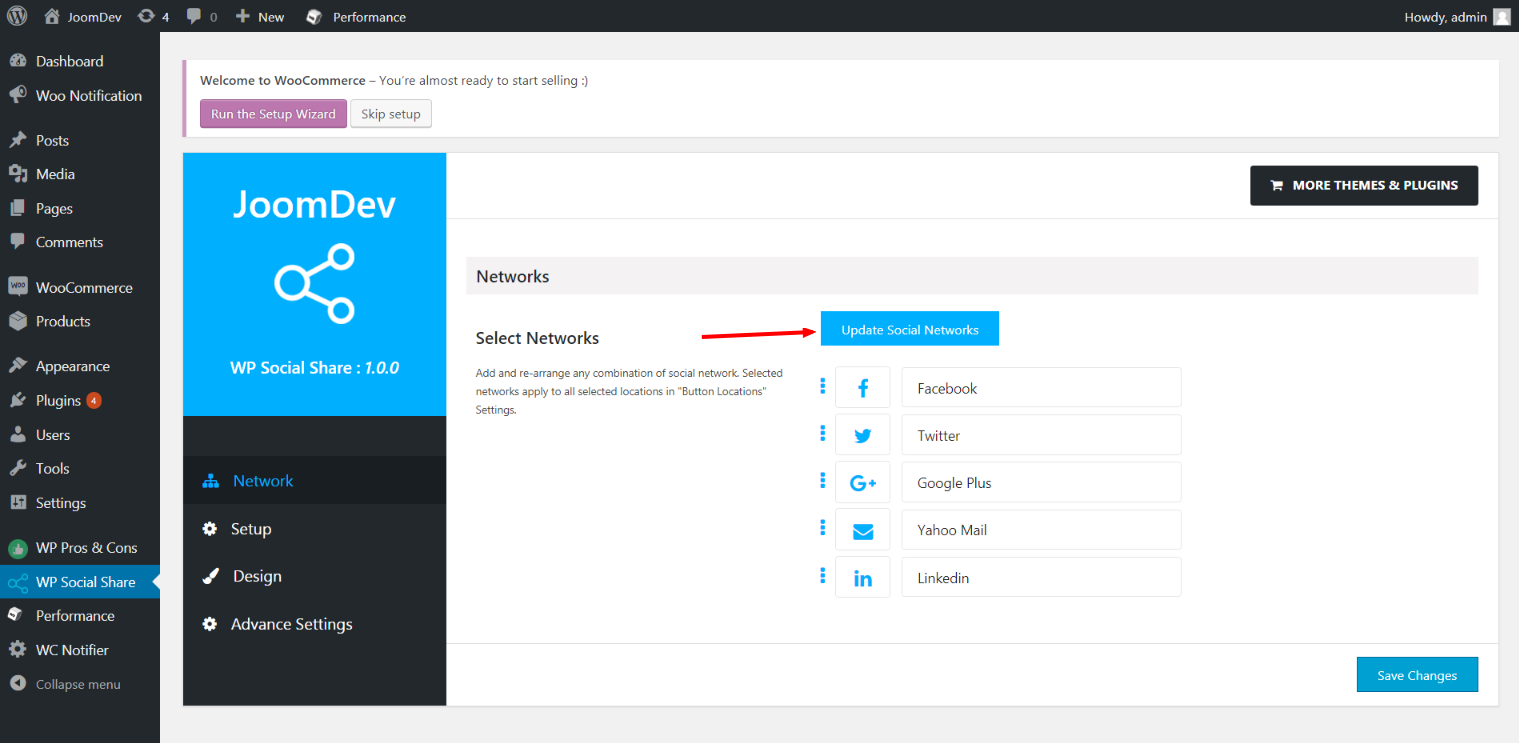
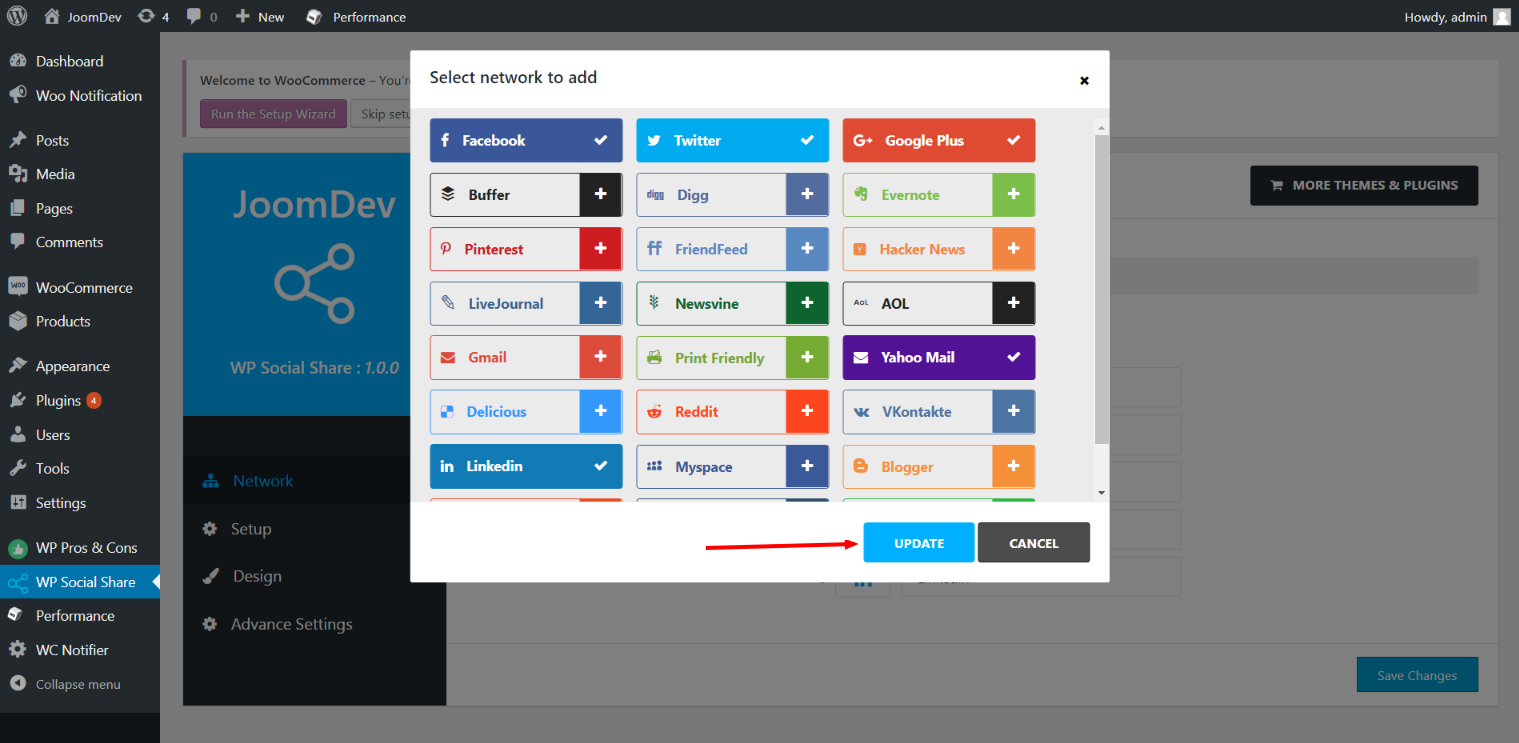
Click here to select networks
Update networks after selecting them.
Setup plugin and api settings.
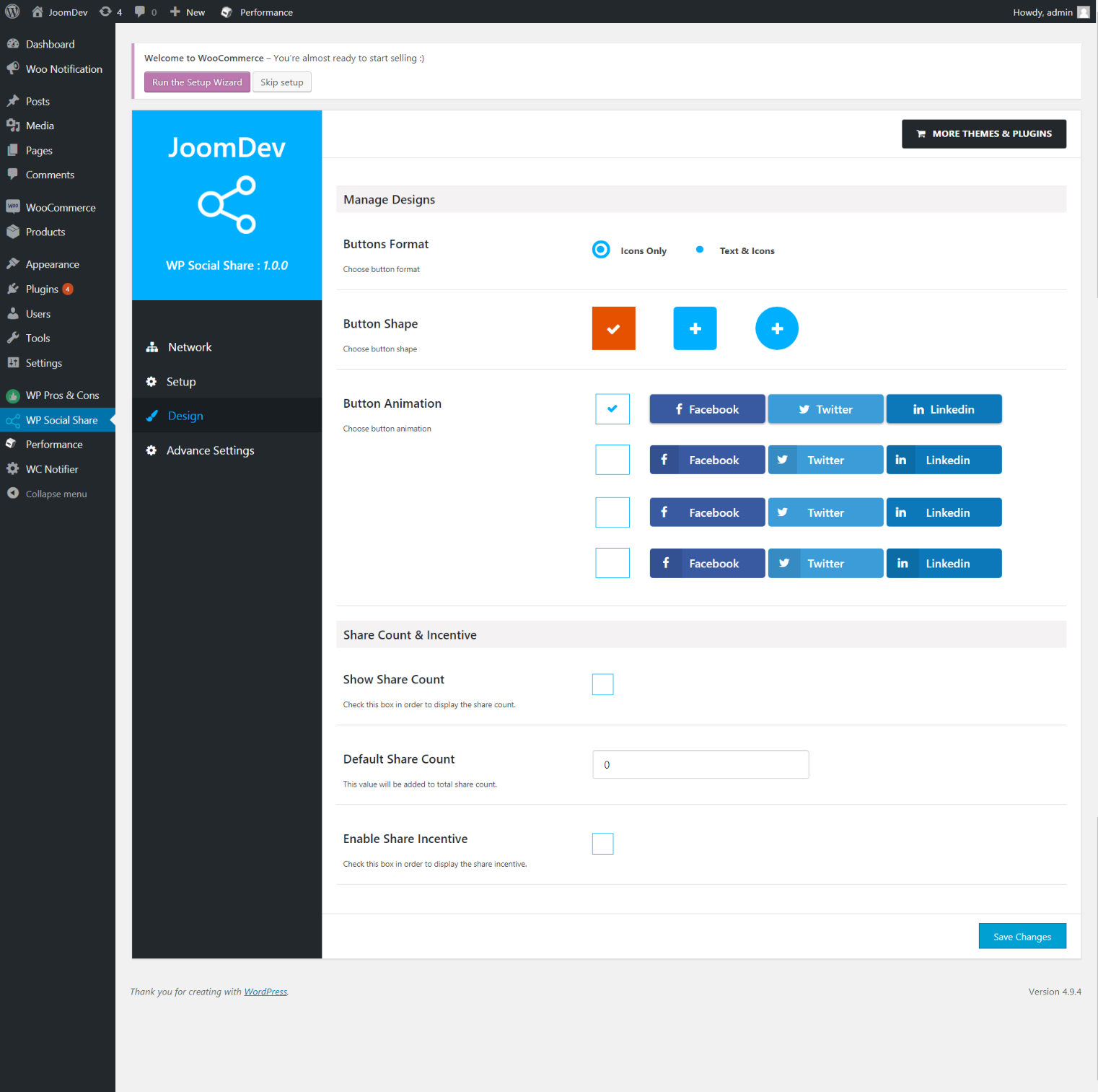
Select any design to display the buttons.
For mobile
For mobile

Instalare

Way 1: 1. Upload joomdev-wp-social-share.zip to the /wp-content/plugins/ directory 2. Extract the zip file. 3. Activate the plugin from wordpress plugins page. And you have done.

Way 2: 1. Go to plugins page in admin. 2. Click on Add New button. 3. Search for „WP ShareX”. 4. Click install on WP Social Share. 5. Activate the plugin.

Întrebări frecvente

Installation Instructions

Way 1:
1. Upload joomdev-wp-social-share.zip to the /wp-content/plugins/ directory
2. Extract the zip file.
3. Activate the plugin from wordpress plugins page. And you have done.

Way 2:
1. Go to plugins page in admin.
2. Click on Add New button.
3. Search for „WP ShareX”.
4. Click install on WP Social Share.
5. Activate the plugin.

How do I use this plugin?

See description.

Recenzii

Excellent!

Arnab Mohapatra 16 martie 2018 1 răspuns
Incredible plugin. It allows to add any sharing button on the page simply and fast!
Citește o recenzie

Contributori și dezvoltatori

„WP ShareX” este un software open-source. La acest modul au contribuit următoarele persoane.

Contributori
  • joomdev

Tradu „WP ShareX” în limba ta.

Te interesează dezvoltarea?

Răsfoiește codul, vezi depozitarul SVN, sau abonează-te la jurnalul de dezvoltare prin RSS.

Istoric modificări

1.0.0

  • New Plugin initialized.

Meta

  • Versiunea 1.0.0
  • Ultima actualizare Acum 8 ani
  • Instalări active: 10+
  • Versiune WordPress 3.0 sau mai recentă
  • Testat până la 4.9.29
  • Limbă
    English (US)
  • Etichete
    sharesocialsocial share
  • Vizualizare avansată

Evaluări

5 din 5 stele.
  • 1 5 – recenzie (stele) 5 stele 1
  • 0 4 – recenzii (stele) 4 stele 0
  • 0 3 – recenzii (stele) 3 stele 0
  • 0 2 – recenzii (stele) 2 stele 0
  • 0 1 – recenzii (stele) o stea 0

Your review

Vezi toate recenziile

Contributori

  • joomdev

Suport

Ai ceva de zis? Ai nevoie de ajutor?

Vezi forumul pentru suport

Donează

Vrei să sprijini dezvoltarea acestui modul?

Donează pentru acest modul

  • Despre
  • Știri
  • Găzduire
  • Confidențialitate
  • Prezentare
  • Teme
  • Module
  • Modele
  • Învață
  • Suport
  • Dezvoltatori
  • WordPress.tv ↗
  • Implică-te
  • Evenimente
  • Donează ↗
  • Five for the Future
  • WordPress.com ↗
  • Matt ↗
  • bbPress ↗
  • BuddyPress ↗
WordPress.org
WordPress.org

În Română

  • Mergi la contul nostru X (fost Twitter)
  • Vizitează contul nostru Bluesky
  • Vizitează contul nostru Mastodon
  • Vizitează contul nostru Threads
  • Vizitează pagina noastră Facebook
  • Vizitează-ne pe Instagram
  • Vizitează-ne pe LinkedIn
  • Vizitează contul nostru TikTok
  • Vizitează canalul nostru YouTube
  • Vizitează contul nostru Tumblr
Codul este poezie.
The WordPress® trademark is the intellectual property of the WordPress Foundation.