
Descriere
My Observer RAG Chat Assistant adds an AI-powered product assistant to your WooCommerce store using Retrieval-Augmented Generation (RAG).
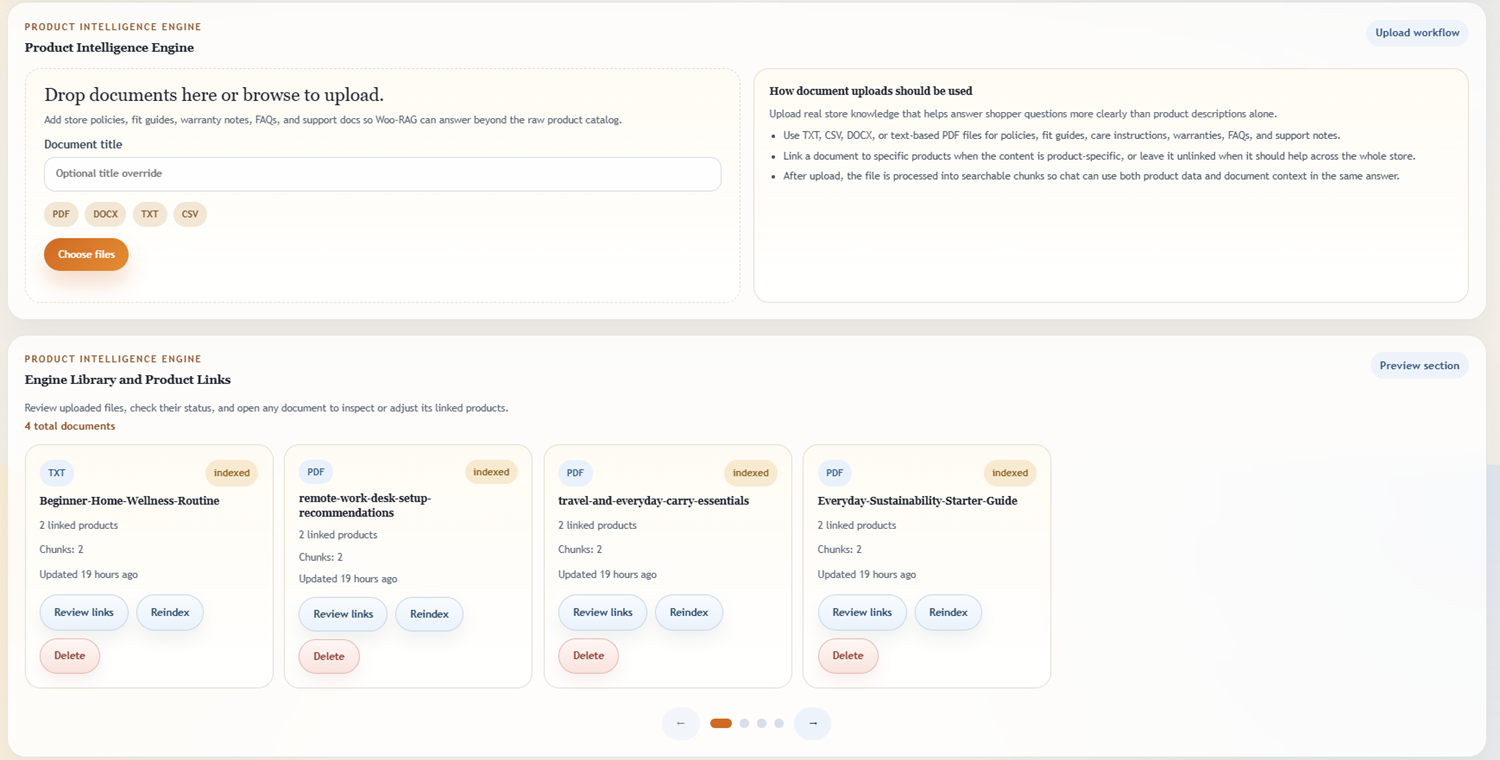
The plugin builds a local product knowledge index from your catalog content and can also ingest supporting business documents through the Product Intelligence Engine. Linked document knowledge is searched alongside WooCommerce product data so shopper responses can use richer store context. You control provider settings, indexing, document uploads, and widget placement directly in WordPress.
This plugin is designed for merchants who want:
* Product-aware chat that can reference your catalog content
* Optional document-aware retrieval linked to WooCommerce products
* A simple setup flow inside wp-admin
* Local vector indexing for retrieval workflows
* Flexibility to use OpenAI or Claude-based configurations
How it works at a high level:
1. Product data is indexed from your WooCommerce catalog.
2. Optional TXT, CSV, DOCX, and text-based PDF files can be uploaded into the Product Intelligence Engine.
3. User questions are matched against relevant product and document context.
4. Your configured LLM provider generates the final response using retrieved context.
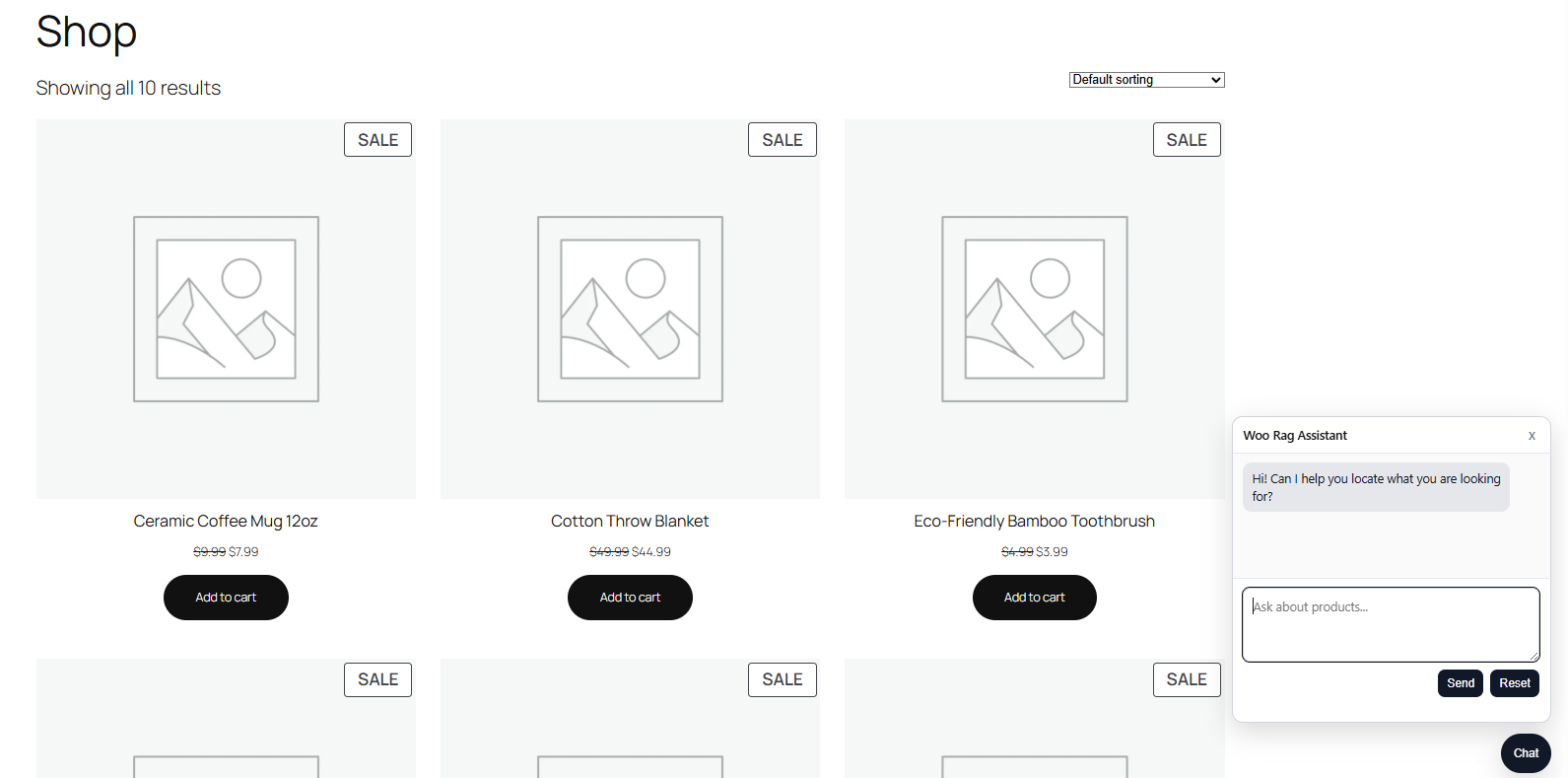
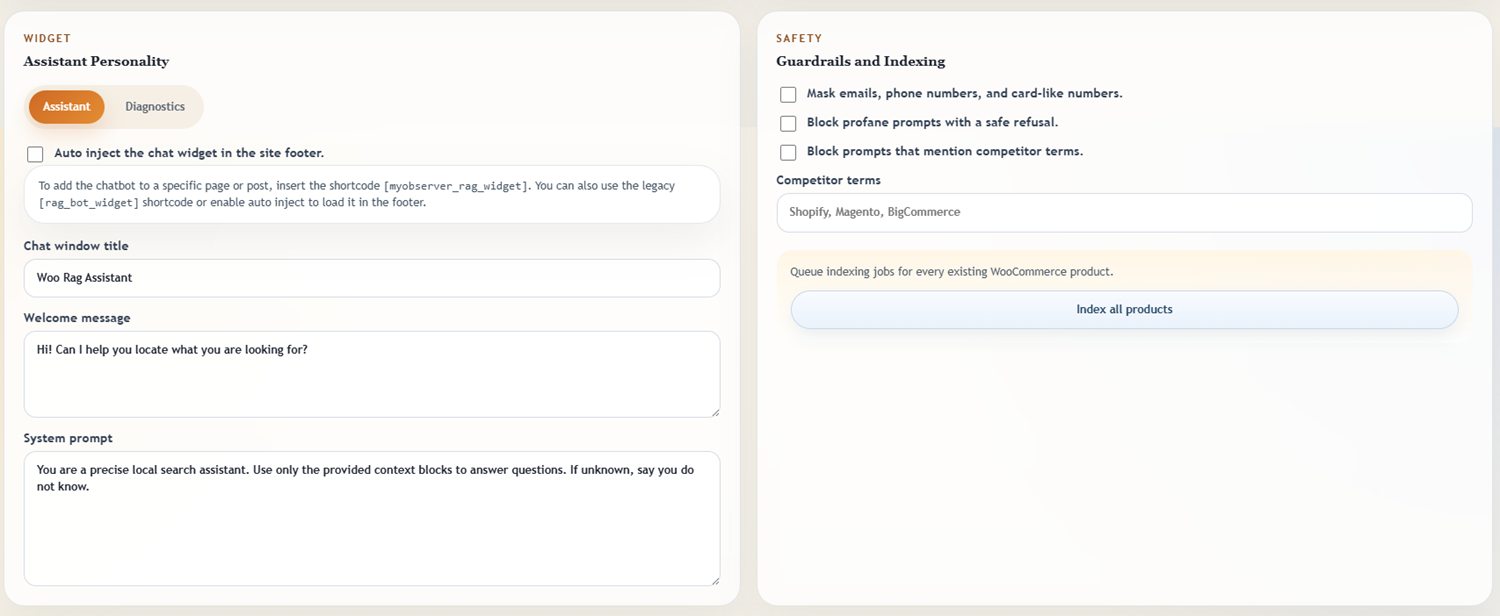
The storefront chat widget can be embedded with shortcode or auto-injected in the footer, and the admin experience includes a modern Angular-based settings UI for runtime configuration and document management.
Features
- Embedded storefront chat widget (
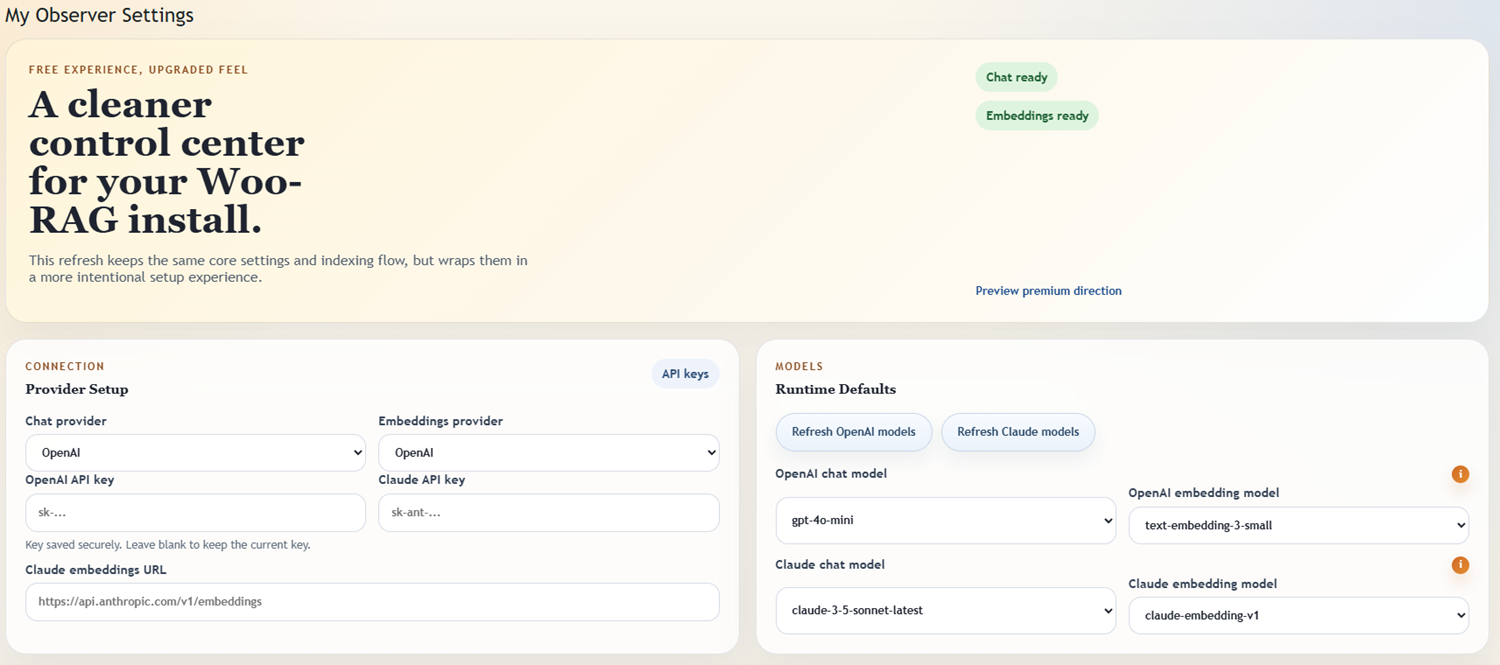
[myobserver_rag_widget]shortcode, legacy[rag_bot_widget], or footer auto-inject) - OpenAI or Claude provider support for chat and embeddings. Once your LLM API Key is entered it will select all models available provided to you by your key.
- Embedding model changes should be treated carefully because the stored vector index is built from a specific embedding family and dimension set. Switching families, or mixing models with different dimensions, can require a full reindex to keep retrieval accurate.
- Local vector storage and product indexing
- Angular-powered admin settings page for providers, API keys, model selection, and runtime controls
- Product Intelligence Engine for document uploads, document-product linking, reindexing, and queue review
- TXT, CSV, DOCX, and text-based PDF ingest support
- Manual „Index All Products” action in admin settings
Bundled build artifacts:
– This plugin ships compiled Angular assets in assets/settings-ui/browser/.
– Source repository (required for WordPress.org readability compliance): https://github.com/darrisb/woo-rag
– Build command example: npm ci && npm run build
Usage
Storefront widget:
* Add [myobserver_rag_widget] where you want chat to render.
* If Auto Inject is enabled, chat can render in wp_footer.
Indexing:
* Go to My Observer > RAG for WooCommerce.
* In the Indexing section, click Index All Products to queue indexing jobs.
Documents:
* Go to My Observer > RAG for WooCommerce.
* In the Product Intelligence Engine section, upload TXT, CSV, DOCX, or text-based PDF files.
* Review linked products, update links, and queue document reindexing as needed.
External services
This plugin can connect to third-party services based on your configuration.
- OpenAI API (
https://api.openai.com)
* Used for: embeddings and chat completions when OpenAI is selected.
* Data sent: product/query text needed to generate embeddings and responses.
* Terms of Use: https://openai.com/policies/terms-of-use/
* Privacy Policy: https://openai.com/policies/privacy-policy/
- Anthropic API (
https://api.anthropic.com)
* Used for: chat completions when Claude is selected.
* Data sent: prompt/context text needed to generate responses.
* Terms: https://www.anthropic.com/legal/commercial-terms
* Privacy Policy: https://www.anthropic.com/legal/privacy
- Custom Claude-compatible embeddings endpoint (
rag_bot_claude_embeddings_url)
* Used for: embeddings generation when a custom endpoint is configured.
* Data sent: product/query text used for embeddings.
* Terms/Privacy: managed by the configured endpoint provider.
Privacy
Review the included privacy policy template and update site policy text as needed for your deployment.
Capturi ecran
Instalare
- Upload the plugin folder to
/wp-content/plugins/. - Activate the plugin in WordPress.
- Confirm WooCommerce is installed and active.
- Go to
My Observer > RAG for WooCommerce. - Configure provider credentials:
OpenAI API Key, orClaude API KeyplusClaude Embeddings URLfor Claude-compatible embeddings.
- Save settings in the Angular admin UI.
- Optionally upload knowledge documents in the Product Intelligence Engine section.
- Add shortcode
[myobserver_rag_widget]to a page, or enable auto inject.
Întrebări frecvente
-
Does this plugin require WooCommerce?
-
Yes. WooCommerce must be installed and active.
-
Can I place the chat widget manually?
-
Yes. Use
[myobserver_rag_widget](or legacy[rag_bot_widget]) in any page, post, or block shortcode element. -
Is product indexing automatic?
-
You can run indexing manually from
My Observer > RAG for WooCommerceusing the „Index All Products” action. -
Can I upload documents to improve retrieval?
-
Yes. The Product Intelligence Engine lets you upload TXT, CSV, DOCX, and text-based PDF files, review them in the admin queue, and link them to WooCommerce products.
-
Does this plugin include payment or subscription checkout by itself?
-
Core storefront assistant functionality is in this plugin. Optional advanced add-ons are provided separately.
-
Do I need to reindex after editing a product?
-
Usually no for normal edits, because updates are queued automatically via cron. Use manual reindex if cron is disabled, delayed, or after large imports/migrations.
-
Does this plugin require an external vector database?
-
No. It uses a high-performance, file-based embedded vector database written in native PHP, separate from your MySQL database.
Recenzii
Nu există nicio verificare pentru acest modul.
Contributori și dezvoltatori
„My Observer RAG Chat Assistant For WooCommerce” este un software open-source. La acest modul au contribuit următoarele persoane.
Contributori
Tradu „My Observer RAG Chat Assistant For WooCommerce” în limba ta.
Te interesează dezvoltarea?
Răsfoiește codul, vezi depozitarul SVN, sau abonează-te la jurnalul de dezvoltare prin RSS.
Istoric modificări
2.0.2
- Updated release packaging and docs for the current
My Observer > RAG for WooCommerceadmin path. - Refined admin labeling so the release matches the current Woo-RAG WordPress menu.
2.0.1
- Updated broken links in chat window.
2.0.0
- Added the new Angular-powered admin settings experience for
My Observer > RAG for WooCommerce. - Added the Product Intelligence Engine for document uploads, document-to-product linking, queue review, and document reindex actions.
- Extended retrieval so uploaded document knowledge can be searched alongside WooCommerce product context.
- Added PDF text extraction support for text-based PDFs during document ingest.
- Improved WordPress admin runtime loading and nonce/config bootstrapping for the new settings UI.
- Cleaned plugin packaging and install structure for WordPress upload/activation compatibility.
- Added built-in diagnostics views for index health, retrieval testing, and live product/document vector reporting.
- Improved the document library UI with queue-style browsing, document totals, inline status messaging, and modal-based linked product review.
- Added document delete actions with automatic vector-store compaction so document counts and storage feedback update more reliably after cleanup.
- Improved full product reindex behavior to rebuild cleanly, compact the local vector store, and report more accurate live index counts.
- Added page-aware storefront chat context so retrieval can prefer the current product, listing, search, cart, or checkout context when relevant.
- Improved local widget and settings UX with better overflow handling, right-aligned save actions, overlay diagnostics results, and immediate readiness updates after saving API credentials.
- Hardened API key handling so saved keys are not returned to the enhanced UI or printed into fallback settings fields.
- Changed the shipped extension manifest to an empty tabs list so production installs do not expose premium placeholder tabs by default.
1.0.0
- Initial public release.