Sari la conținut
WordPress.org

În Română

  • Teme
  • Module
  • Știri
  • Suport
  • Despre
  • Evenimente
  • Localizare
  • Dialog
  • Obține WordPress
Obține WordPress
WordPress.org

Plugin Directory

WP Last Login

  • Trimite un modul
  • Favoritele mele
  • Autentifică-te
  • Trimite un modul
  • Favoritele mele
  • Autentifică-te

WP Last Login

De Konstantin Obenland
Descarcă
Previzualizează live
  • Detalii
  • Recenzii
  • Instalare
  • Dezvoltare
Suport

Descriere

WP Last Login records when each user signs in and surfaces it as a sortable column on the Users screen — so you can see who’s active, identify dormant accounts, and confirm that real people are coming back.

Features

  • Sortable „Last Login” column on the Users screen, including the network admin user list on multisite.
  • Hover any date to reveal the exact login time.
  • Captures logins via the standard wp_login action, so it works with any login flow that triggers it — including the Two Factor plugin, WooCommerce, BuddyBoss, and most social-login plugins.
  • Users without a recorded login show a neutral em-dash (—) — never a misleading „never” — and still sort correctly when ordered by last login.
  • Lightweight: one user meta key, no settings page, no extra database tables.
  • Filter hooks let you customize the date format or hide the column from non-admin roles.

Plugin Filter Hooks

wpll_current_user_can (boolean)

Whether the column is supposed to be shown.
Default: true

wpll_date_format (string)

The date format string for the date output.

Capturi ecran
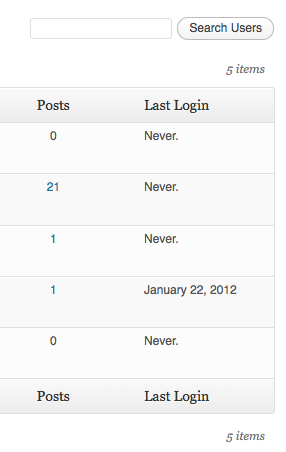
Last login column in the user table.

Instalare

  1. Download WP Last Login.
  2. Unzip the folder into the /wp-content/plugins/ directory.
  3. Activate the plugin through the ‘Plugins’ menu in WordPress.

Întrebări frecvente

Why does the column show an em-dash (—) for all my users?

The plugin records a login when a user signs in after it’s been activated. WordPress doesn’t store historical login data, so existing accounts will start populating their „Last Login” the next time each user logs in. Hovering the dash shows a tooltip explaining the same.

How do I change the date format or show the time?

The date follows your site’s general date format (Settings → General); the exact time appears on hover. To override the date format, use the wpll_date_format filter:

add_filter( 'wpll_date_format', function() {
    return 'Y-m-d H:i';
} );

How do I hide the column from non-admin users?

Filter wpll_current_user_can and return a capability check. Login tracking still happens — only column visibility is gated:

add_filter( 'wpll_current_user_can', function() {
    return current_user_can( 'manage_options' );
} );

Does it work with multisite, Two Factor, WooCommerce, BuddyBoss, or social login plugins?

Yes. The plugin hooks into WordPress’s standard wp_login action, so any login method that triggers it is captured. The Two Factor plugin (which interrupts wp_login) is supported via a dedicated hook.

What happens to my data if I deactivate the plugin?

Deactivating leaves stored login timestamps intact, so reactivating preserves history. Uninstalling (deleting the plugin entirely) removes all of the plugin’s user meta.

Recenzii

Very useful

Joris Le Blansch 1 ianuarie 2026
Simple, yet very useful plugin. Using it on dozens of sites I manage.

as perfect as simple

amiens80 4 octombrie 2024
this is the kind of plugin i love : just install, activated, no need setting, it runs fine! no need support. As an english person, i have no need to translate it at all. Great one ! Work fine on wp 6.6.2 and wp 6.6.1 ps : I would request another tiny feature : add the last ip of login date !

Works WP 6.5

flyingkites 3 aprilie 2024
Switched to this plugin as another similar plugin by YooHoo was incompatible with TwoFactor. This works with both TwoFactor and Limit Login Attempts plugins. [Anyone who says it does not work likely has a code conflict with another plugin]

Excellent + now compatible with Two Factor

DigitalGdn 27 decembrie 2023
Well maintained plugin. This is the only ‘last login’ plugin I have found that supports two factor.

Doesn’t work, sadly

editorialteamnwu 30 ianuarie 2023
Totally useless: every user is listed as never having logged in, even the one I’m currently logged in as to view this. Two stars instead of one because at least it didn’t seem to break anything.

Is not reliable

Dirk 18 noiembrie 2019 4 răspunsuri
It shows users as Login „Never” even the users have been logged in. I decided on this information to delete users! Good luck, I had an early backup of the database! Do not trust in this Plugin!
Citește toate cele 25 de recenzii

Contributori și dezvoltatori

„WP Last Login” este un software open-source. La acest modul au contribuit următoarele persoane.

Contributori
  • Konstantin Obenland

„WP Last Login” a fost tradus în 11 locale. Mulțumim traducătorilor pentru contribuția lor.

Tradu „WP Last Login” în limba ta.

Te interesează dezvoltarea?

Răsfoiește codul, vezi depozitarul SVN, sau abonează-te la jurnalul de dezvoltare prin RSS.

Istoric modificări

7

  • Added compatibility with Two Factor plugin. Props @bkno.
  • Improved date display to display login time on hover.

6

  • Revamped file structure to remove unnecessary files.
  • Fixed a bug where login dates were overwritten on plugin reactivation. Props @richardbuff.

5

  • Improved uninstall routine (no longer queries all users).
  • Updated utility class.
  • Tested with WordPress 6.1.

4

  • Improved date display to account for the timezone of the site. Props @knutsp.

3

  • Fixed a bug where users who haven’t logged in disappear from user lists when ordering by last login. See https://wordpress.org/support/topic/new-users-dont-get-the-meta-field/

2

  • Maintenance release.
  • Updated code to adhere to WordPress Coding Standards.
  • Tested with WordPress 5.0.

1.4.0

  • Fixed a long standing bug, where sorting users by last login didn’t work.
  • Tested with WordPress 4.3.

1.3.0

  • Maintenance release.
  • Tested with WordPress 4.0.

1.2.1

  • Reverts changes to wp_login() as the second argument seems not to be set at all times.

1.2.0

  • Users are now sortable by last login!
  • Updated utility class.
  • Added Danish translation. Props thomasclausen.

1.1.2

  • Fixed a bug where content of other custom columns were not displayed.

1.1.1

  • Updated utility class.

1.1.0

  • Made the display of the column filterable.
  • Widened the column a bit to accommodate for large date strings.

1.0

  • Initial Release.

Meta

  • Versiunea 7
  • Ultima actualizare Acum 3 luni
  • Instalări active: 10.000+
  • Versiune WordPress 6.5 sau mai recentă
  • Testat până la 6.9.7
  • Versiune PHP 7.4 sau mai recentă
  • Limbi

    Arabic, Danish, Dutch, English (US), Finnish, French (France), German, Italian, Norwegian (Bokmål), Spanish (Chile), Spanish (Spain) și Swedish.

    Tradu în limba ta

  • Etichete
    adminlast loginloginuser
  • Vizualizare avansată

Evaluări

3.7 din 5 stele.
  • 13 5 – recenzii (stele) 5 stele 13
  • 3 4 – recenzii (stele) 4 stele 3
  • 2 3 – recenzii (stele) 3 stele 2
  • 3 2 – recenzii (stele) 2 stele 3
  • 4 1 – recenzii (stele) o stea 4

Recenzia ta

Vezi toate recenziile

Contributori

  • Konstantin Obenland

Suport

Ai ceva de zis? Ai nevoie de ajutor?

Vezi forumul pentru suport

Donează

Vrei să sprijini dezvoltarea acestui modul?

Donează pentru acest modul

  • Despre
  • Știri
  • Găzduire
  • Confidențialitate
  • Prezentare
  • Teme
  • Module
  • Modele
  • Învață
  • Suport
  • Dezvoltatori
  • WordPress.tv ↗
  • Implică-te
  • Evenimente
  • Donează ↗
  • Cadouri ↗
  • WordPress.com ↗
  • Matt ↗
  • bbPress ↗
  • BuddyPress ↗
WordPress.org
WordPress.org

În Română

  • Mergi la contul nostru X (fost Twitter)
  • Vizitează contul nostru Bluesky
  • Vizitează contul nostru Mastodon
  • Vizitează contul nostru Threads
  • Vizitează pagina noastră Facebook
  • Vizitează-ne pe Instagram
  • Vizitează-ne pe LinkedIn
  • Vizitează contul nostru TikTok
  • Vizitează canalul nostru YouTube
  • Vizitează contul nostru Tumblr
Codul este poezie.
The WordPress® trademark is the intellectual property of the WordPress Foundation.