Title: Screen Reader Text Format
Author: Reaktiv
Published: 15 octombrie 2021
Last modified: 15 noiembrie 2024
---
Caută module
Acest modul **nu a fost testat cu ultimele 3 versiuni importante ale WordPress**.
S-ar putea să nu mai fie întreținut sau susținut și ar putea avea probleme de compatibilitate
când este folosit cu versiuni recente ale WordPress.

# Screen Reader Text Format
De [Reaktiv](https://profiles.wordpress.org/reaktivstudios/)
[Descarcă](https://downloads.wordpress.org/plugin/screen-reader-text-format.1.1.zip)
* [Detalii](https://ro.wordpress.org/plugins/screen-reader-text-format/#description)
* [Recenzii](https://ro.wordpress.org/plugins/screen-reader-text-format/#reviews)
* [Instalare](https://ro.wordpress.org/plugins/screen-reader-text-format/#installation)
* [Dezvoltare](https://ro.wordpress.org/plugins/screen-reader-text-format/#developers)
[Suport](https://wordpress.org/support/plugin/screen-reader-text-format/)
## Descriere
Screen Reader Text Format adds a screen reader only text format control to the block
editor. This allows content creators to correctly markup certain types of text content.
For example, when using the _strikethrough_ text format, it is almost always correct
to include screan reader text that indicates the content has been struck out and
if the content is replaced with an insert, the correct solution is to include screen
reader text that indicates the insertion.
Without this ability, content creators will have to do complicated HTML edits to
create the correct text informing screen readers of strike, insert, and even „important”
notes that are indicated with bold text since screen readers are completely agnostic
towards those HTML tags.
## Instalare
1. Upload the `screen-reader-text-format` folder and all its contents to the `/wp-
content/plugins/` directory
2. Activate the plugin through the ‘Plugins’ menu in WordPress
## Întrebări frecvente
### Why do I need to use screen reader text?
The most common use case is when the text had been formated using things like strike.
This is great for visual users, but users who are accessing content via a screen
reader will not know what has happened.
For example, let’s say you are writting about a product and that product is normally
$100 but the price is marked down to $80. This might be represented as ~$100~ $80.
That is to say `$100 $80`. A screen reader will read „$100 $80” with
no mention of the strike through.
In the best case scenerio this would be written out „Was $100 now $80” but often
the design will not allow the space, hence the shorthand. To fix this for screen
readers, the screen reader text format can be used to include „was” and „now” so
this will make more sense for screen readers.
### How do I use this?
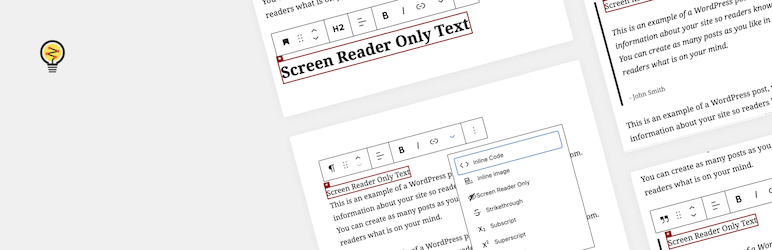
In the block editor, most text content like paragraphs, headings, and lists have
a text format toolbar. To use the tool add your text, then highlight it. This should
bring up the text format toolbar. Click the down arrow and select the screen reader
text format.
### How do I find hidden text?
Once you add and hide text it may be difficult to find. Fortunately we added some
highlighting to make this easier. When you are editing a block, any text that is
hidden within the block or it’s children will be displayed with highlighted.
## Recenzii

### [A no-brainer for accessibility](https://wordpress.org/support/topic/a-no-brainer-for-accessibility/)
[Eric Amundson](https://profiles.wordpress.org/sewmyheadon/) 21 iunie 2023
This simple utility makes adding helpful screen reader text to blocks easy. This
is especially helpful to give more meaning to generic calls-to-action like Learn
more or View bio buttons.

### [Absolutely brilliant!](https://wordpress.org/support/topic/absolutely-brilliant-93/)
[Vanderbeam](https://profiles.wordpress.org/vanderbeam/) 2 februarie 2022
I always add my own screen reader text into sites for a variety of reasons (adding
non-visual context to sections, adding extensions to buttons like „Read more [about
article title]”, and so on). But it’s a manual process and can sometimes be a bit
tricky. This plugin makes adding screen reader text much more efficient and event
allows some of my clients to add it on their own. I didn’t discover this plugin
too long ago, but so far I haven’t experienced any issues. I only use Gutenberg
and block library plugins (nothing like Divi or Elementor), and so far it’s been
compatible with everything. Such an awesome contribution to the repo! An asset for
any site!
[ Citește toate cele 2 recenzii ](https://wordpress.org/support/plugin/screen-reader-text-format/reviews/)
## Contributori și dezvoltatori
„Screen Reader Text Format” este un software open-source. La acest modul au contribuit
următoarele persoane.
Contributori
* [ Reaktiv ](https://profiles.wordpress.org/reaktivstudios/)
* [ Josh Eaton ](https://profiles.wordpress.org/jjeaton/)
* [ Nick the Geek ](https://profiles.wordpress.org/nick_thegeek/)
„Screen Reader Text Format” a fost tradus în 1 locală. Mulțumim [traducătorilor](https://translate.wordpress.org/projects/wp-plugins/screen-reader-text-format/contributors)
pentru contribuția lor.
[Tradu „Screen Reader Text Format” în limba ta.](https://translate.wordpress.org/projects/wp-plugins/screen-reader-text-format)
### Te interesează dezvoltarea?
[Răsfoiește codul](https://plugins.trac.wordpress.org/browser/screen-reader-text-format/),
vezi [depozitarul SVN](https://plugins.svn.wordpress.org/screen-reader-text-format/),
sau abonează-te la [jurnalul de dezvoltare](https://plugins.trac.wordpress.org/log/screen-reader-text-format/)
prin [RSS](https://plugins.trac.wordpress.org/log/screen-reader-text-format/?limit=100&mode=stop_on_copy&format=rss).
## Istoric modificări
#### 1.1.0
* [fix] Issue with block based widget editor
* [chore] Update build method
* [chore] Code standard updates
* [chore] Optimize images
#### 1.0.0
* Initial release
## Meta
* Versiunea **1.1**
* Ultima actualizare **Acum 2 ani**
* Instalări active: **200+**
* Versiune WordPress ** 5.4 sau mai recentă **
* Testat până la **6.7.6**
* Limbi
* [English (US)](https://wordpress.org/plugins/screen-reader-text-format/) și [French (France)](https://fr.wordpress.org/plugins/screen-reader-text-format/).
* [Tradu în limba ta](https://translate.wordpress.org/projects/wp-plugins/screen-reader-text-format)
* [Vizualizare avansată](https://ro.wordpress.org/plugins/screen-reader-text-format/advanced/)
## Evaluări
5 din 5 stele.
* [ 2 5 – recenzii (stele) ](https://wordpress.org/support/plugin/screen-reader-text-format/reviews/?filter=5)
* [ 0 4 – recenzii (stele) ](https://wordpress.org/support/plugin/screen-reader-text-format/reviews/?filter=4)
* [ 0 3 – recenzii (stele) ](https://wordpress.org/support/plugin/screen-reader-text-format/reviews/?filter=3)
* [ 0 2 – recenzii (stele) ](https://wordpress.org/support/plugin/screen-reader-text-format/reviews/?filter=2)
* [ 0 1 – recenzii (stele) ](https://wordpress.org/support/plugin/screen-reader-text-format/reviews/?filter=1)
[Your review](https://wordpress.org/support/plugin/screen-reader-text-format/reviews/#new-post)
[Vezi toate recenziile](https://wordpress.org/support/plugin/screen-reader-text-format/reviews/)
## Contributori
* [ Reaktiv ](https://profiles.wordpress.org/reaktivstudios/)
* [ Josh Eaton ](https://profiles.wordpress.org/jjeaton/)
* [ Nick the Geek ](https://profiles.wordpress.org/nick_thegeek/)
## Suport
Ai ceva de zis? Ai nevoie de ajutor?
[Vezi forumul pentru suport](https://wordpress.org/support/plugin/screen-reader-text-format/)