Sari la conținut
WordPress.org

În Română

  • Teme
  • Module
  • Știri
  • Suport
  • Despre
  • Evenimente
  • Localizare
  • Dialog
  • Obține WordPress
Obține WordPress
WordPress.org

Plugin Directory

Display Post Metadata

  • Trimite un modul
  • Favoritele mele
  • Autentifică-te
  • Trimite un modul
  • Favoritele mele
  • Autentifică-te

Display Post Metadata

De Fahid Javid
Descarcă
  • Detalii
  • Recenzii
  • Instalare
  • Dezvoltare
Suport

Descriere

It is a useful plugin to display the metadata information and custom fields of posts and pages or custom post type. You can either display date, author, comments, views or sticky meta information and custom fields list or maybe if you like then you can display all of them.

Features

You can list the following information:

  • Published Date (The day when the post is published on the website)
  • Author (The Person who created the post or page)
  • Views (Number of people which have seen the post)
  • Sticky (If the post is sticky or not)
  • Comments (Number of comments on the post)
  • Custom Fields (The default custom fields of posts and pages) for more details please consult Custom Fields codex page.

Links

  • GitHub Repository

Please don’t forget to rate my Plugin if you find it useful, thanks.

Capturi ecran
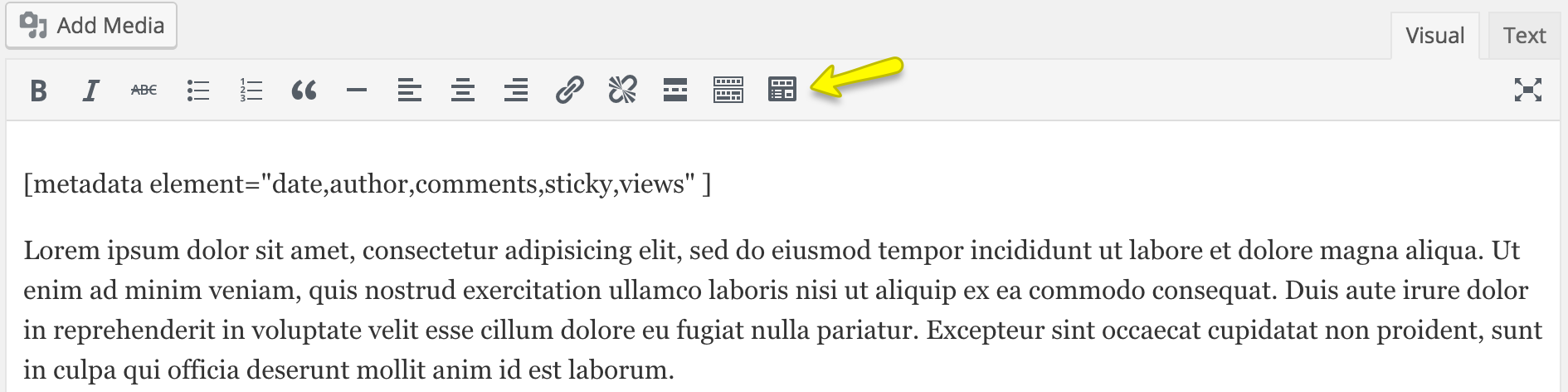
  • Visual shortcode insert button and shortcode.
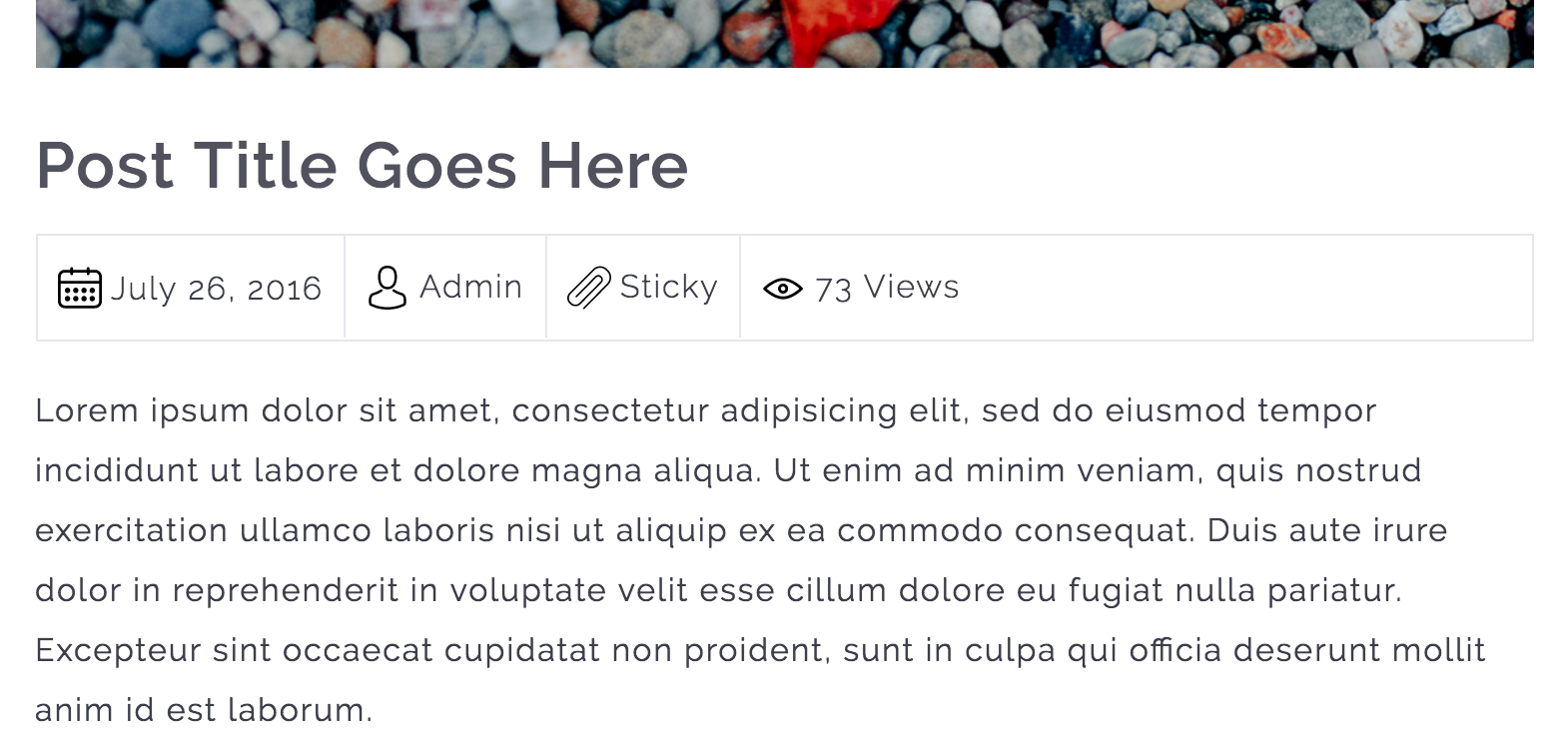
  • Metadata information is displayed.

  • Custom Fields list is displayed.

Instalare

Instructions for installing the Display Post Metadata Plugin.

  1. In your WordPress admin go to Plugins -> Add New.
  2. Enter Display Post Metadata in the text box and click Search Plugins.
  3. In the list of Plugins click Install Now next to the Display Post Metadata.
  4. Once installed click to activate.
  5. Now go to any page, post or custom post type and edit it.
  6. While editing, you can put the shortcode to display the metadata information. The shortcode is [metadata element=”date,author,comments,sticky,views,custom_fields”]

Întrebări frecvente

Does this plugin works with all major PHP versions?

Yes, it works with all major PHP versions and I have tested it with PHP version 5.2, 5.3, 5.4, 5.5, 5.6 and 7.0.

Recenzii

Simple and excellent

qilight 26 iunie 2024 1 răspuns
This plugin is so useful. My theme won’t allow me to place the meta underneath my title within the text block (their suggestion/solution was to manually type it in – ha, what a joke). Then, I found this plugin and it does exactly what I needed. From all those plugins out there, this is the ONLY ONE that offers a simple solution to a common problem (within theme restrictions). Customer support is excellent as well. Any question, just ask and they will respond promptly and help find solutions. 6 stars if I could!

Excellent!

awoob4wporg 30 noiembrie 2021 1 răspuns
Good job!

Good Work

M Hassan Raza 3 septembrie 2016
It is very helpful and nicely designed plugin. Hoping for good polishing updated of this one too 😉
Citește toate cele 3 recenzii

Contributori și dezvoltatori

„Display Post Metadata” este un software open-source. La acest modul au contribuit următoarele persoane.

Contributori
  • Fahid Javid

Tradu „Display Post Metadata” în limba ta.

Te interesează dezvoltarea?

Răsfoiește codul, vezi depozitarul SVN, sau abonează-te la jurnalul de dezvoltare prin RSS.

Istoric modificări

1.5.5

  • WordPress 6.9 compatibility confirmed
  • Updated minimum WP requirement to 6.0
  • Updated minimum PHP requirement to 8.3 (recommended by WordPress.org)
  • Updated translation files for multilingual support
  • General code improvements

1.5.4

  • Updated language file
  • Tested with WordPress 6.7.1

1.5.3

  • Updated language file
  • Tested with WordPress 6.2

1.5.2

  • Tested with WordPress 6.0.3

1.5.1

  • Tested with WordPress 5.9.1

1.5.0

  • Improved security of the plugin.
  • Tested with WordPress 5.8.2

1.4.0

  • Tested with WordPress 5.7.1

1.3.0

  • Tested with WordPress 5.4.1

1.2.0

  • Added custom fields support for the posts and pages.
  • Improved shodcode execution method.

1.1.0

  • Add a TinyMCE editor button to insert ‘metadata’ shortcode through a popup which will collect all of the user input for the shortcode attributes.

1.0.1

  • Added Comments Post Metadata support
  • Updated POT file.

1.0.0

  • Initial Release

Meta

  • Versiunea 1.5.5
  • Ultima actualizare Acum 5 luni
  • Instalări active: 500+
  • Versiune WordPress 6.0 sau mai recentă
  • Testat până la 6.9.4
  • Versiune PHP 8.3 sau mai recentă
  • Limbă
    English (US)
  • Etichete
    custom post typemetametadatapagepost
  • Vizualizare avansată

Evaluări

5 din 5 stele.
  • 3 5 – recenzii (stele) 5 stele 3
  • 0 4 – recenzii (stele) 4 stele 0
  • 0 3 – recenzii (stele) 3 stele 0
  • 0 2 – recenzii (stele) 2 stele 0
  • 0 1 – recenzii (stele) o stea 0

Your review

Vezi toate recenziile

Contributori

  • Fahid Javid

Suport

Ai ceva de zis? Ai nevoie de ajutor?

Vezi forumul pentru suport

  • Despre
  • Știri
  • Găzduire
  • Confidențialitate
  • Prezentare
  • Teme
  • Module
  • Modele
  • Învață
  • Suport
  • Dezvoltatori
  • WordPress.tv ↗
  • Implică-te
  • Evenimente
  • Donează ↗
  • Five for the Future
  • WordPress.com ↗
  • Matt ↗
  • bbPress ↗
  • BuddyPress ↗
WordPress.org
WordPress.org

În Română

  • Mergi la contul nostru X (fost Twitter)
  • Vizitează contul nostru Bluesky
  • Vizitează contul nostru Mastodon
  • Vizitează contul nostru Threads
  • Vizitează pagina noastră Facebook
  • Vizitează-ne pe Instagram
  • Vizitează-ne pe LinkedIn
  • Vizitează contul nostru TikTok
  • Vizitează canalul nostru YouTube
  • Vizitează contul nostru Tumblr
Codul este poezie.
The WordPress® trademark is the intellectual property of the WordPress Foundation.