Multi Page Auto Advance for Gravity Forms

Descriere

Build faster Gravity Forms multi-page forms with fewer clicks. Multi Page Auto Advance moves visitors to the next page automatically after they answer supported fields, so your forms feel smoother without custom JavaScript.

Instead of asking visitors to answer a question, find the Next button, click again, and wait for the next step, this Gravity Forms add-on can advance the form immediately after a supported answer.

Use it for lead forms, intake forms, quizzes, surveys, quote requests, onboarding, and any Gravity Forms workflow where fewer clicks can improve completion.

What the free plugin does

  • Auto-advance Gravity Forms pages after radio button choices
  • Auto-advance Gravity Forms pages after dropdown selections
  • Create a smoother one-question-at-a-time form experience in WordPress
  • Reduce extra Next button clicks in multi-page forms
  • Configure auto-advance from the Gravity Forms field settings panel
  • Keep your forms built in Gravity Forms instead of moving to a separate form builder

Common use cases

  • Gravity Forms auto next after a radio button answer
  • Gravity Forms auto advance after a dropdown choice
  • Multi-step lead generation forms
  • Client intake forms with fewer clicks
  • Quiz and survey flows
  • Quote request forms
  • Typeform-style WordPress forms built with Gravity Forms

Which plan should I use?

  • Free is best for simple multi-page Gravity Forms that should advance after a radio button or dropdown answer.
  • Pro is best when you need more polished multi-page behavior, including hidden navigation buttons, conditional logic handling, transition animations, step color controls, and advanced Gravity Forms add-on workflows such as products, polls, quizzes, and surveys.
  • Plus is best for agencies and advanced one-question-at-a-time forms. It adds broader field triggers such as checkbox, text, textarea, number, and address fields, plus upgraded conversational form functionality and unlimited-site licensing.

Pro ($39.99/year)

Upgrade to Pro when your Gravity Forms workflow needs more polished multi-page behavior.

Everything from Free, plus:

  1. Product field support
  2. Poll, quiz, and survey workflow support
  3. Conditional logic support
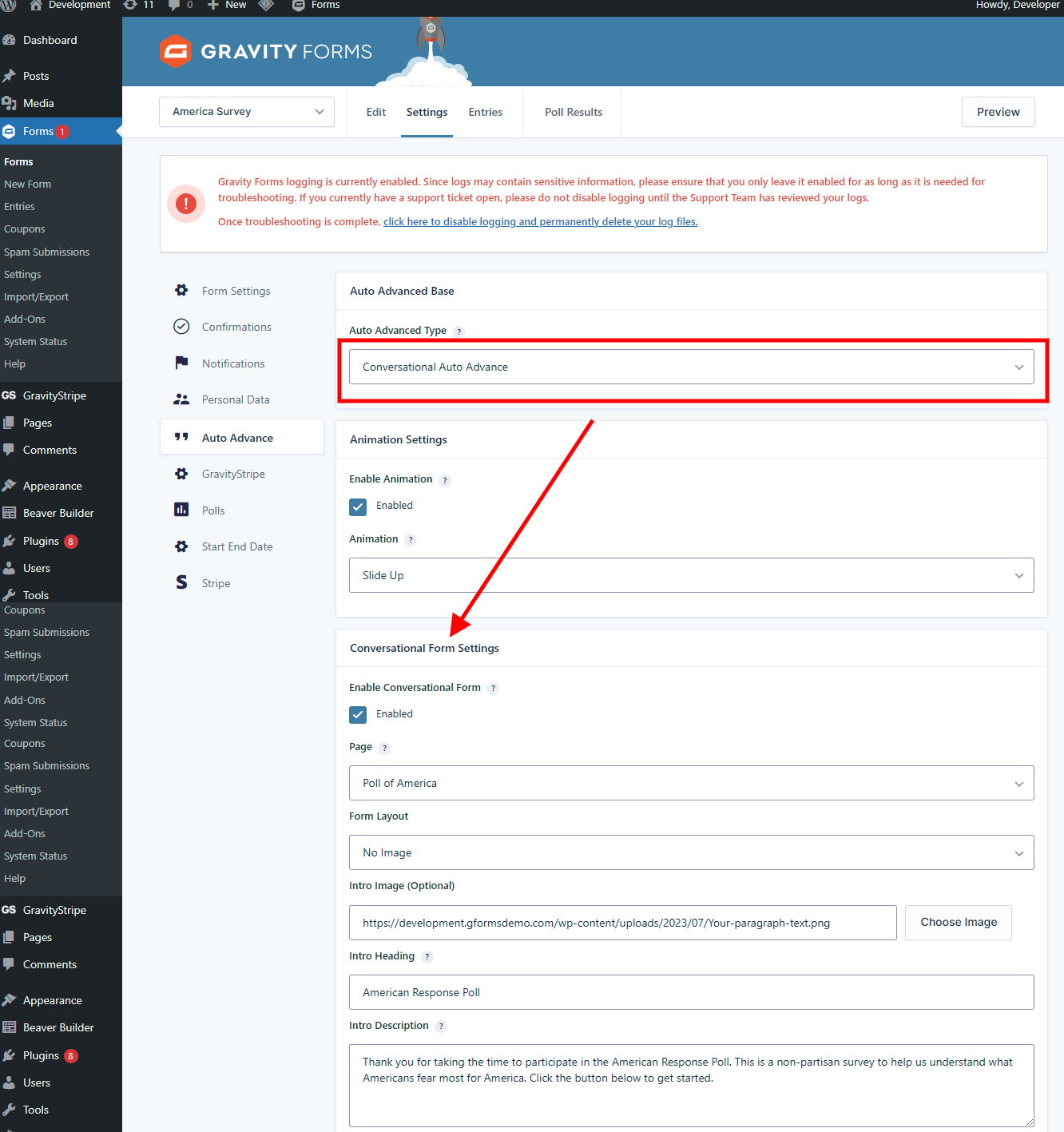
  4. Gravity Forms Conversational Forms Add-On support
  5. Hide Next and Previous buttons where appropriate
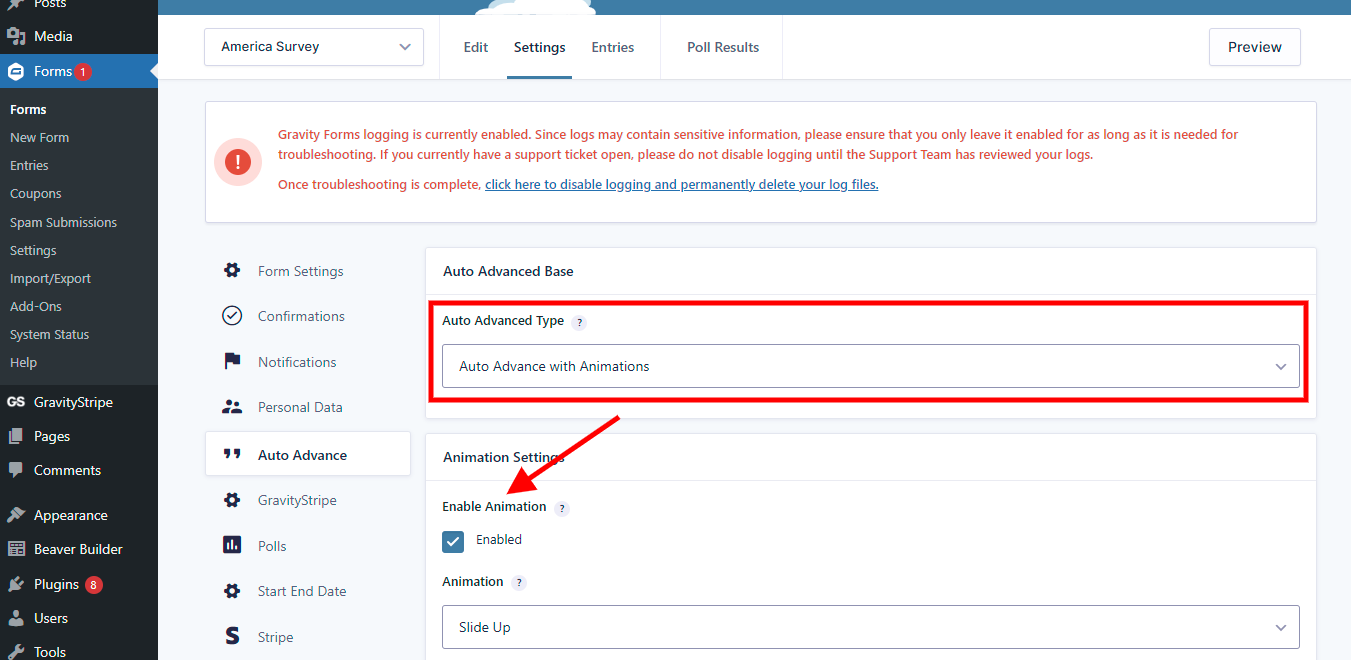
  6. Transition animations
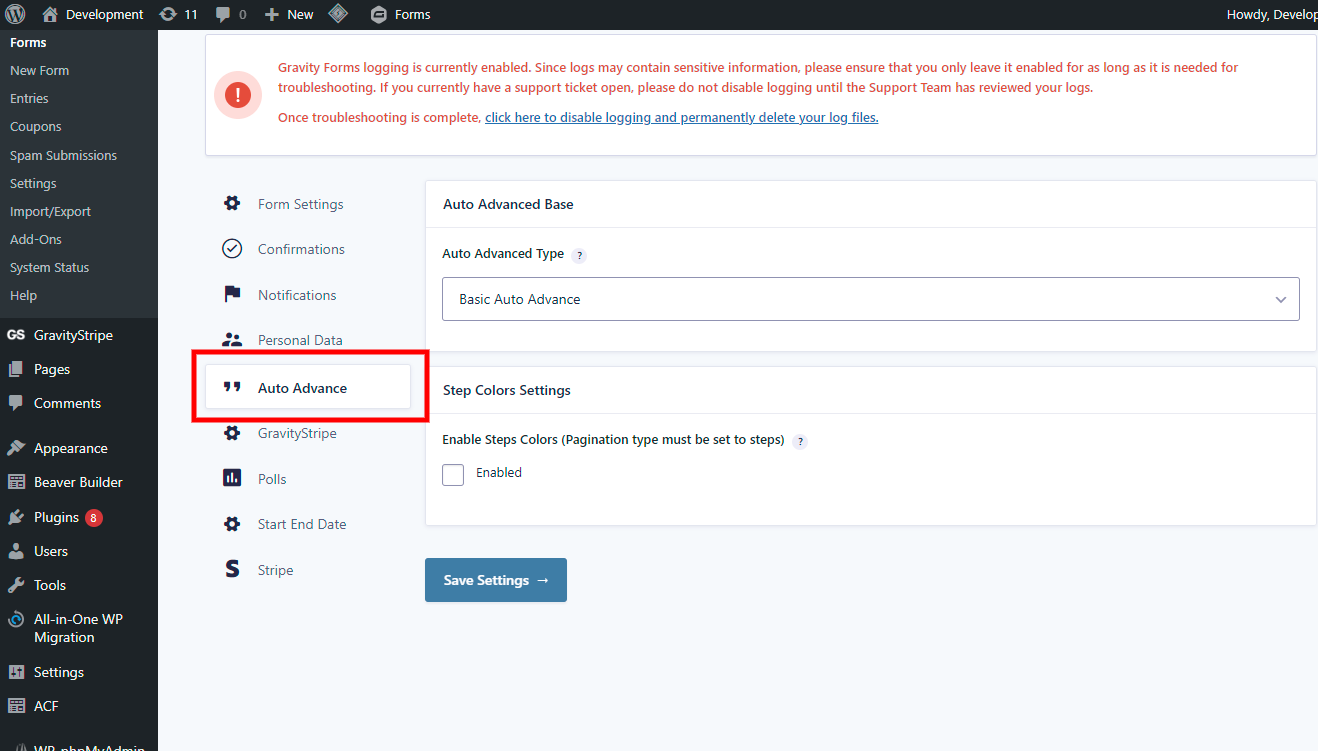
  7. Step color controls

[GET PRO]

Plus ($59/year or $225 lifetime)

Everything from Pro, plus broader auto-advance triggers and upgraded conversational form functionality for more advanced one-question-at-a-time experiences.

Plus adds:

  1. Checkbox field auto-advance
  2. Text and textarea field auto-advance
  3. Number field auto-advance
  4. Address field auto-advance
  5. Upgraded conversational form functionality
  6. Unlimited-site licensing for client and agency work

Watch the conversational settings video

[GET PLUS]

Resources

Videos

Capturi ecran

Instalare

  1. Upload the plugin files to the /wp-content/plugins/multipage-auto-advance directory, or install the plugin through the WordPress plugins screen directly.
  2. Activate the plugin through the Plugins screen in WordPress.
  3. Open or create a Gravity Forms multi-page form.
  4. Add a Radio Button or Dropdown field.
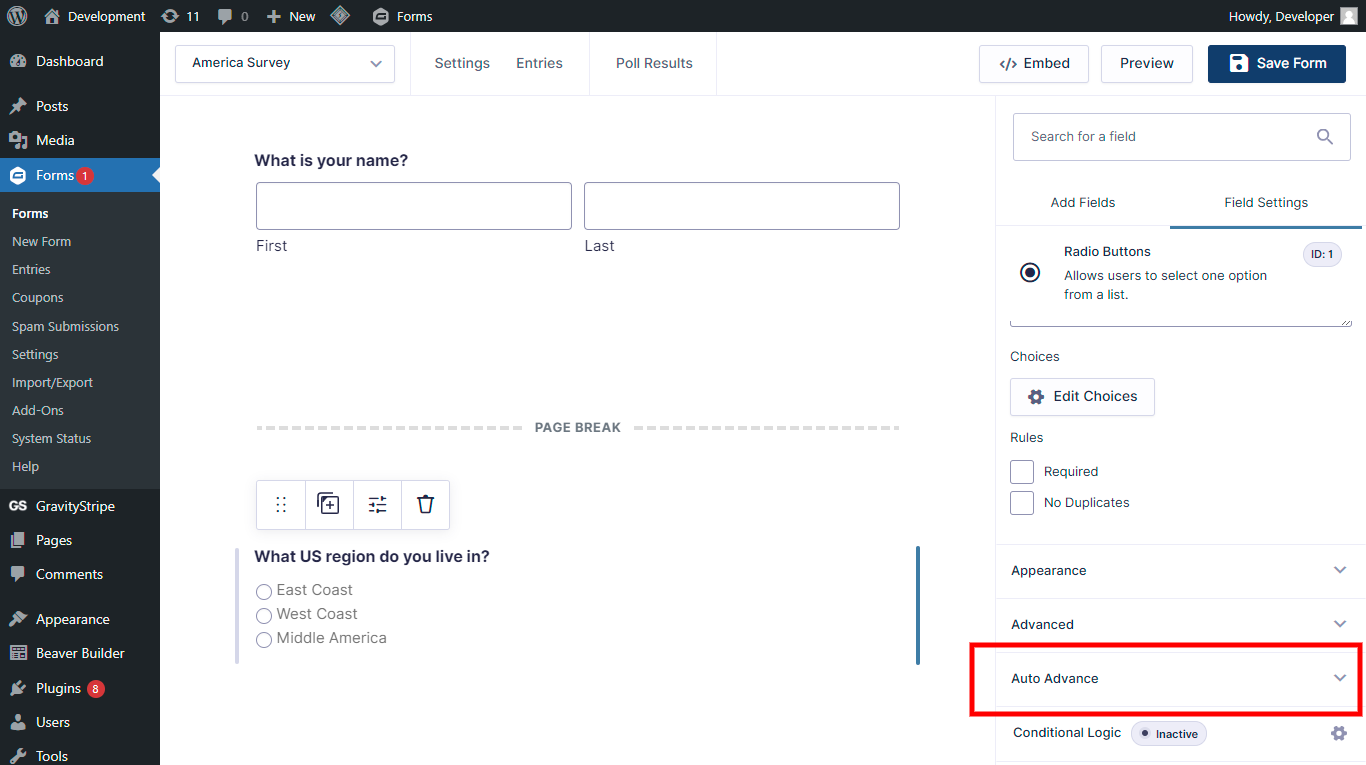
  5. Open the field settings and enable Auto Advance.
  6. Save the form and test the frontend flow.

Once enabled, the selected field can trigger Gravity Forms to move to the next page automatically.

Întrebări frecvente

Which Gravity Forms fields are supported in the free version?

The free version supports radio button fields and dropdown fields.

Pro adds product, poll, quiz, survey, conditional logic, navigation, animation, and Gravity Forms Conversational Forms Add-On workflow support. Plus adds broader trigger fields, including checkbox, text, textarea, number, and address fields.

Does this work with Gravity Forms multi-page forms?

Yes. Multi Page Auto Advance is built for Gravity Forms multi-page forms. It helps move visitors from one page or step to the next after they answer a supported trigger field.

Can I hide the Next button in Gravity Forms?

Yes. The plugin includes settings for hiding manual navigation buttons where appropriate, so visitors can move through the form by answering questions instead of clicking Next after every step.

How do I set up Gravity Forms auto-advance?

  1. Create a new form or open an existing one
  2. Click any Radio Button or Dropdown question that you want to be a trigger.
  3. Check the box for Auto Advance in the settings for the question.
  4. Save the form and test it on the frontend.

Can I build a Typeform-style form with Gravity Forms?

Yes. Multi Page Auto Advance can help create a more conversational, one-question-at-a-time Gravity Forms experience. The free version supports basic radio and dropdown auto-advance, while Pro and Plus add more advanced field and conversational form support.

Does auto-advance replace Gravity Forms?

No. This is an add-on for Gravity Forms. You still build and manage your forms in Gravity Forms, and this plugin adds auto-advance behavior to supported fields.

Is it possible to have two triggers on one form page?

Yes, as long as both are not set as „required”. If both are ‘required’ then the form will not advance to the next page and an error message will show.

Recenzii

13 decembrie 2024
We’ve been using Auto Advance on a client site for a number of years now, but something happened recently that disrupted the flow of a certain part of the site, David was very friendly, very helpful and managed to sort out our issue and updated the plugin code to fix the issue and resupplied all within a day of reporting/asking for assistance. This plugin is the only one we’ve found that successfully allows for the auto advancing of Gravity Forms fields, the Free version now does what is required for our clients site saving them a little money and every little helps since they are a charity organisation, highly recommend David and this product. Thank youScott
27 septembrie 2024
We ran into an issue related to updates and David was fast and friendly with an effective response and resolution. Huge help.
27 mai 2024 1 răspuns
This is the worst plugin you could ever install. It has a constant and horrendous nag in the admin area. This has also been flagged as a serious security risk by our hosting. AVOID!!
6 ianuarie 2023 1 răspuns
Warning: Undefined variable $input_type in /homepages/40/d689953319/htdocs/clickandbuilds/Moiz/wp-content/plugins/auto-advance-for-gravity-forms/class-gfautoadvancedaddon.php on line 239 This kind of error held on form page when I active plug-in.
3 august 2022
This plugin works well for our use case. We did have a small problem at first but the support team quickly solved the issue. We later had other questions for support who really went the extra mile to help us try and solve a form issue. I highly recommend this plugin.
Citește toate cele 19 recenzii

Contributori și dezvoltatori

„Multi Page Auto Advance for Gravity Forms” este un software open-source. La acest modul au contribuit următoarele persoane.

Contributori

Istoric modificări

5.0.5

  • Updated SDK.

5.0.4

  • Updated SDK.
  • Fixed issue with disabled button for hide Next button.
  • Added loader on conversational form.
  • Other minor bug fixes.

5.0.3

  • Added vendor support for upgrading.
  • Fixed quiz and poll field issue.

5.0.2

  • Fixed latest submission issue with auto submitting.

5.0

  • Limited the free version to radio button and dropdown auto-advance support.

4.7

  • Added notice for free users to upgrade to paid Pro or Plus at 50% discount.
  • Limited the free version to radio button and dropdown auto-advance support.

4.6.3

  • Fixed gform post render issue.
  • Updated conversational pagination to follow settings inside the form.

4.6.2

  • Fixed auto-advance crash issue in some free-version scenarios.

4.6.1

  • Updated resources and info.
  • Fixed minor bugs related to the form editor.

4.6

  • Added PHP 8.0 compatibility.
  • Added latest WordPress support.
  • Fixed warnings and bugs.
  • Added conversational form support for Plus.
  • Added Gravity Forms Conversational Add-On support for Pro.
  • Added step color controls.
  • Added animations.
  • Added new settings area.